

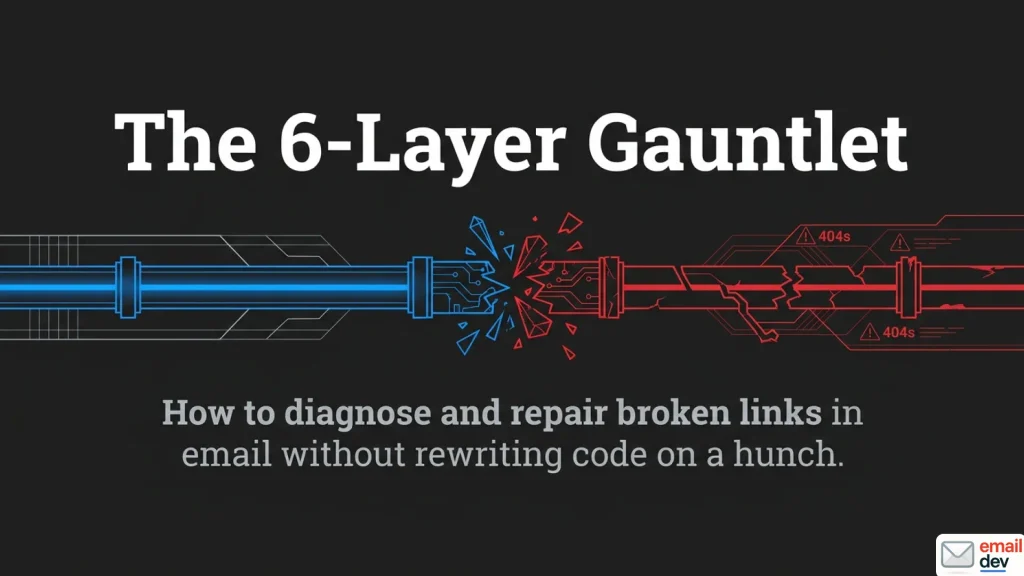
Quick answer: Broken links in email break at six different points. How you wrote the URL. How your ESP rewrote it for click tracking. How the message was encoded in transit. How a security gateway rewrote it again. How the recipient’s client handled the click. And whether the destination still exists. Work out which layer failed before you change anything. A typo and a Safe Links rewrite look identical to the person reporting them, and they have nothing in common as fixes.
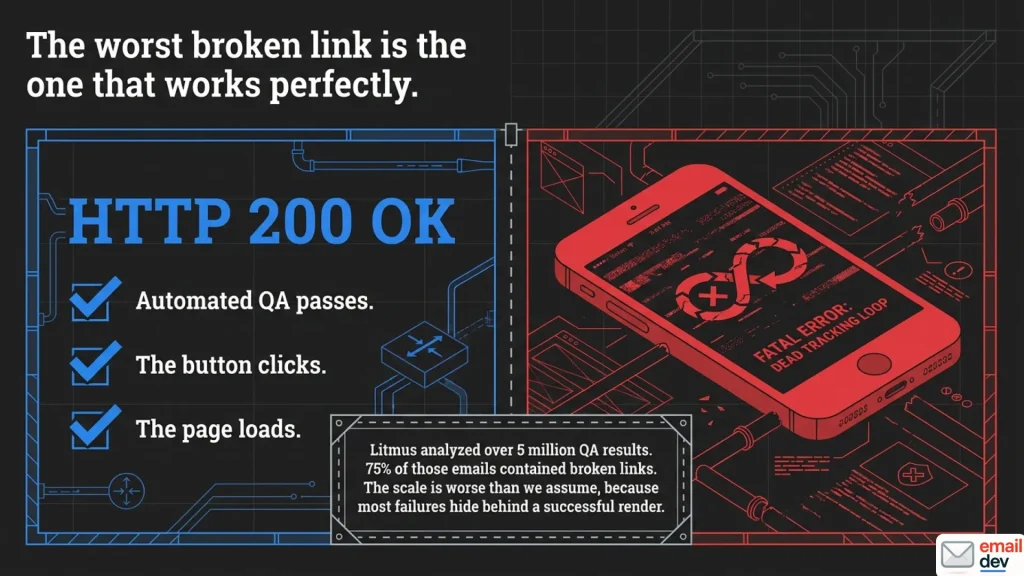
The worst of all broken links in email is the one that works.
It renders. It’s blue, or it’s a nice fat button in your brand colour. It clicks. Something even happens when you click it. It’s just that the something is the wrong page, or a 404, or your app opening on the home screen with no idea why it was summoned.
That category is where most of my debugging time goes. Not the obvious dead link. The one that passes every automated check because it returns a perfectly cheerful 200.
And the scale of the boring version is worse than people assume. Litmus looked at over five million of their own Previews and QA results across a year and reported that 75% of the emails contained broken links. Three quarters. I’d take that number with the usual pinch of salt you take any vendor’s number with, since the emails going through a QA tool are by definition the ones somebody suspected of being broken. But even halved it’s grim.
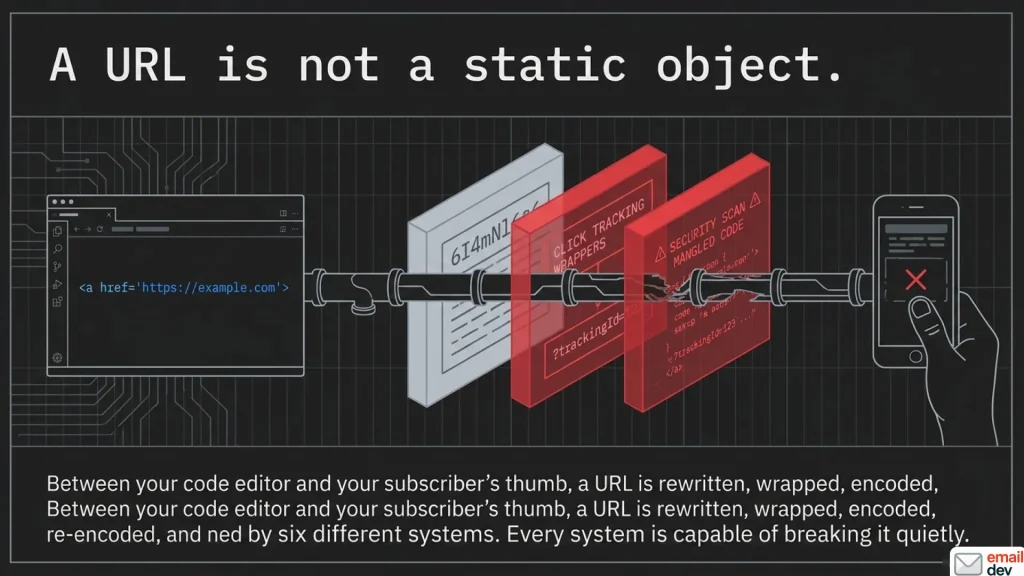
A URL is not a static object. It gets rewritten, wrapped, encoded, re-encoded and scanned by roughly six different systems between your code editor and your subscriber’s thumb. Every one of those systems is capable of breaking it. Most of them do it quietly.
The ESP help-centre articles cover about one and a half of those six. Typo, missing protocol, page deleted. Fine as far as it goes, which is not very far.
This guide is the other four and a half. If you want the wider view on why email breaks in general, the pillar piece on email rendering issues sorts the whole inbox by rendering engine. This one does the same trick for URLs.
Six places a link dies between your editor and their thumb
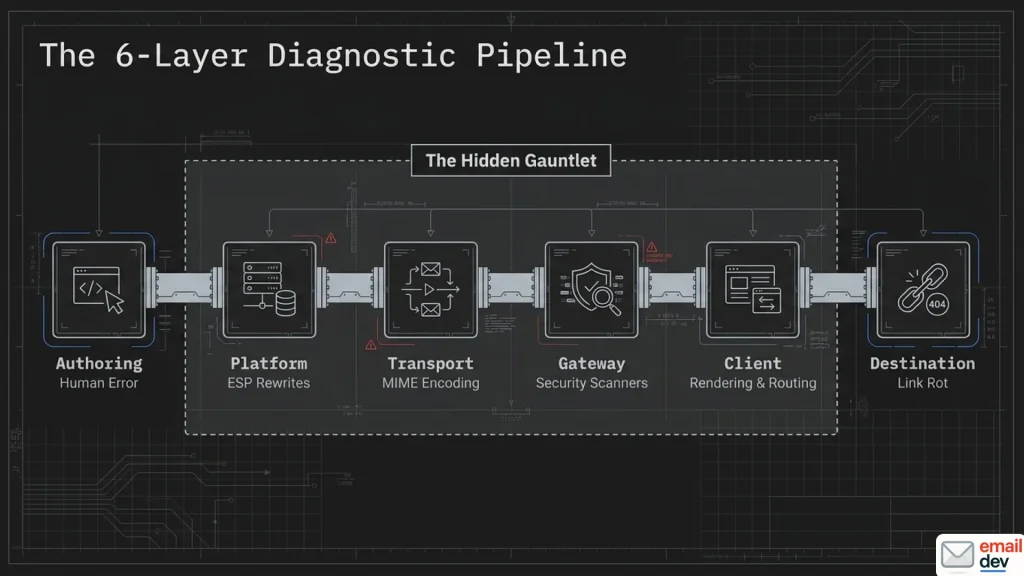
Before you touch anything, work out where the link died. This is the whole method. Everything below slots into one of six layers, and each layer has completely different fixes.
The six layers
| Layer | What it does to your URL | Symptom you’d see | Jump to |
|---|---|---|---|
| 1. Authoring | Nothing. You wrote it wrong | 404, wrong page, unclickable text | Layer one |
| 2. Platform (your ESP) | Swaps the href for a tracking redirect | Link works locally, breaks after send | Layer two |
| 3. Transport (MIME) | Encodes the message for SMTP | Stray = or a line break inside the URL | Layer three |
| 4. Gateway (security) | Rewrites the URL into a scanning wrapper | safelinks.protection.outlook.com, auth loops, 403s | Layer four |
| 5. Client | Renders, routes or hijacks the click | Works in Gmail, not Outlook. Or app opens cold | Layer five |
| 6. Destination | The page moved, expired or died | Clean 404 for everybody | Layer six |
Pick the row that matches your symptom. Then go to that section. Most broken links in email resolve to exactly one row. You do not need to read all of this in order, and I’d rather you didn’t.
Three questions that get you to the right layer
Run these in order. Stop at the first useful answer.
- Does the link work when you paste it into a browser, taken from the source of a real send? If no, you’re in layer 1, 3 or 6. If yes, keep going.
- Does the URL in the received message still look like the one you wrote? A tracking domain means your ESP. A
safelinks.protection.outlook.comwrapper means the recipient’s security stack. A stray=or a hard break means encoding. - Does it break for one group of recipients only? Then it’s the gateway or the client. Which means the recipient’s IT department is now part of your story.
Three questions, maybe two minutes. It beats rewriting the template on a hunch, and it works on every category of broken links in email I’ve had to chase.
The thing it usually isn’t
It’s rarely random. It’s almost never “the internet was weird”.
A link that works for you and fails for 12% of your list is a systematic failure with a boring cause. The fastest route to the cause is asking which 12%.
Broken links in email cluster. They cluster by client, by security product, by account type, by mobile OS. When something looks capricious, you’re usually looking at a segment you haven’t identified yet.
Layer one: the broken links in email you made yourself
Everybody has shipped a link with no protocol. I’m not going to be smug about this section. Plenty of broken links in email really are just authoring mistakes. It is, however, still where a decent chunk of the damage comes from, so let’s dispatch it quickly.
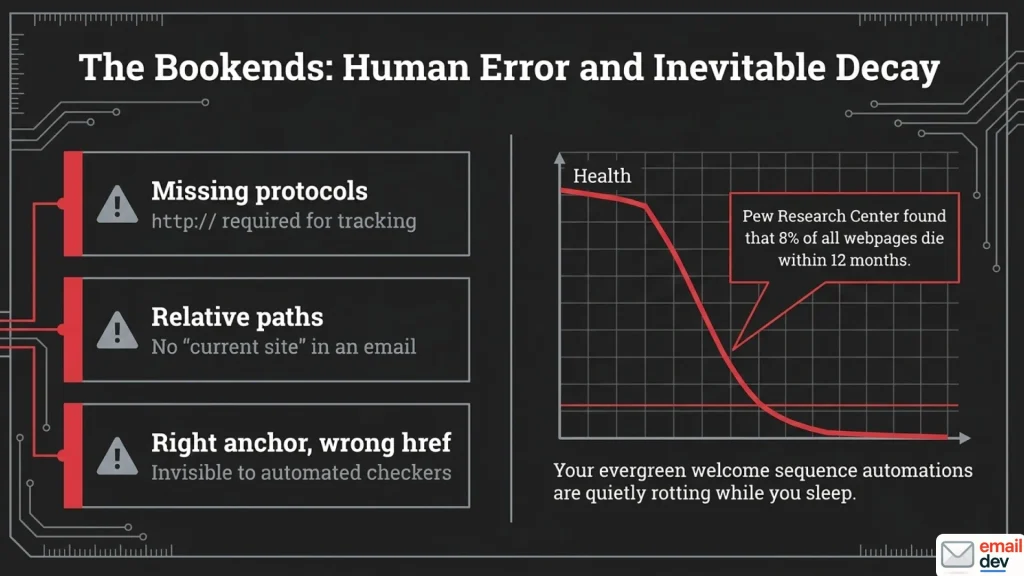
The four that account for most of it
Missing protocol
Symptom: the link is dead, or goes somewhere absurd, and only after sending. Cause: no http:// or https://. Mailchimp’s own troubleshooting documentation is explicit about this – links that don’t begin with a protocol may break once click tracking is applied, and their click-tracking docs say flatly that they can only track links starting with http:// or https://. Fix: absolute URLs, with the protocol, every time. Effort: quick.
Relative paths
Symptom: /pricing works in your local preview and resolves against the tracking domain after send. Cause: there is no “current site” in an email. There is only the internet. Fix: absolute URLs. Same rule, different mistake. Effort: quick.
Right anchor text, wrong href
Symptom: nothing. That’s the problem. Cause: the link is valid and points at last month’s campaign, or the staging URL, or the doc you copied the button from. Fix: a human reads the anchor text and the destination side by side. Every link. Effort: quick, and tedious, and unavoidable.
This one deserves a moment. An automated link checker returns a happy 200 on a link that goes to entirely the wrong page. No tool catches it. I’ll recommend tools later in this article, and I want that limitation on the record before I do.
Unencoded characters
Symptom: the URL truncates at a space, or a parameter goes missing. Cause: spaces, ampersands, or non-ASCII characters sitting raw in the URL or the UTM values. Fix: encode them. If you’re building personalised URLs, test one containing a real name with an accent in it. Effort: quick.
Mailto, tel and anchor links, which are all slightly cursed
Nobody covers this and it comes up constantly.
mailto: links cannot be click-tracked by most platforms. Mailchimp documents this plainly – clicks on email address and anchor links can’t be tracked, and mailto links go to a mail program rather than a webpage, so there’s no click to record. Mailchimp Transactional (the platform formerly called Mandrill) says the same thing about its own click tracking. Marketo behaves the same way, for the same structural reason. There’s no HTTP request to intercept.
If you need to measure a mailto:, route it through a redirect you control. Don’t expect the ESP to solve it.
Anchor links inside an email are worse. Support across clients is patchy, and the platforms don’t track them either – an anchor never leaves the message, so there’s nothing to log. Sanford Whiteman put it about as bluntly as it can be put on the Marketo community: anchor links within an email never go anywhere, so they can’t be tracked. I treat in-email jump links as decoration. If your email needs a table of contents to be navigable, the email is too long.
System merge tags are the other blind spot. Mailchimp lists *|ARCHIVE|*, *|UPDATE_PROFILE|* and *|UNSUB|* as untrackable, and they don’t count toward the click totals in your report either. Your click report is quietly incomplete and doesn’t tell you so.
UTM parameters and the way they multiply
Keep them boring. Consistent naming, lowercase, no spaces.
Watch the total URL length, because long URLs interact badly with layer three and with some gateways. And watch for the builder that appends its own parameters on top of yours. You end up with two question marks in one URL, which resolves to nothing useful.
Effort: quick, once. Then it’s a template problem, not a campaign problem.
Layer two: your ESP rewrites every link and doesn’t tell you
This is the section for the in-house marketer and the producer running launches. It’s also the layer people forget exists.
What click tracking actually does to your HTML
At send time, your platform swaps every trackable href for a redirect through its own tracking domain. The click hits their server, gets logged, then redirects on to your real URL.
That’s normal. It’s how click reporting works, everywhere, on every platform.
It’s also a rewrite step. Which means the link you tested locally is not the link that gets sent. Mailchimp says as much in its documentation: when click tracking is on, tracking information is added to each click-through URL.
So testing your local HTML file tests the wrong artefact. A surprising share of broken links in email exist only in the sent version. It’s the same rule as the pillar’s advice about rendering. The platform is part of the pipeline.
What survives the rewrite badly
- Links with no protocol
- Relative paths
mailto:and anchor links, skipped by most platforms- Links containing merge tags or scripting. Salesforce Marketing Cloud’s Engagement Splits only track clicks on static links – anything carrying a personalisation string or AMPScript falls out, which is why personalised URLs quietly break journey logic
- System merge tags for archive, profile update and unsubscribe
- Very long parameterised URLs. Mailchimp Transactional skips tracking on any link where the tracked version would exceed 255 bytes, and says so in the docs
- Anything inside a conditional comment, which is the bridge into layer five
Amazon SES lets you opt a specific link out of tracking with a ses:no-track attribute on the anchor. Mailchimp Transactional has mc:disable-tracking for the same job. Marketo has a Track Link checkbox you can untick per link. Useful when you have a link that must arrive untouched. Worth knowing your own platform’s equivalent before you need it.
The tracking link with an expiry date
Here’s one that surprised me the first time I hit it, and it’s buried in Adobe’s own Marketo documentation rather than any blog.
If a Marketo email was sent over 365 days ago and nobody has clicked any of its links in the last 180 days, Marketo prunes the route from its database. The tracked link stops resolving. The email is still sitting in somebody’s inbox looking perfectly fine.
This matters more than it sounds, because people do treat old emails as bookmarks. They dig up your receipt or your welcome email from two years ago and click the link in it. If that route has been pruned, they get nothing.
Marketo’s own advice: if the link needs to be permanent, disable tracking on it. Check whether your platform does something similar. Most don’t advertise it.
Custom tracking domains, and the four ways they fail
You want a custom tracking domain. It isolates your reputation, it aligns every domain in the message, and it stops you sharing a redirect domain with whoever else is on your platform.
Then it breaks, usually in one of four ways.
- CNAME not propagated. Links resolve to nothing. Usually caught in the first hour, occasionally not.
- SSL certificate not issued yet. The domain resolves, the browser throws a warning, the subscriber leaves.
- DNS proxying interfering. Proxied records can break CNAME-based tracking or block certificate issuance entirely.
- Old templates still hardcoding the previous domain. This one survives migrations for years. Nobody greps the template library.
And a rule I’ll state flatly: never ship HTTP tracking links. Some TLDs – .app, .dev, .page and others – sit on the browser HSTS preload list, which means the browser won’t make a plain HTTP connection to them at all. It doesn’t warn and continue. It upgrades to HTTPS, and if the certificate isn’t there, the click just fails.
Effort: moderate once, then permanent.
The platform builder problem
Some platforms reformat markup they don’t recognise the moment you paste it in. GetCourse, various course platforms, a few CRMs with an email module bolted on.
Conditional comments get eaten. Attributes get stripped. A button loses half its markup and nobody notices, because it still looks like a button.
The rule stands: paste the raw HTML, save, then test from a real send inside the platform. Not from your local file. If an email passed every check and still broke, this is where I look second, right after the ESP rewrite.
Layer three: the link broke in transit
Short section, quite technical, and almost nobody covers it. Which is exactly why it’s worth 300 words. Transport-layer broken links in email are rare, but they’re maddening when they happen.
Quoted-printable, soft line breaks, and the URL with a hole in it
RFC 5322 limits a transmitted line to 998 characters and recommends 78. Quoted-printable encoding, defined in RFC 2045, caps encoded lines at 76 characters. It uses a trailing = as a soft line break, meaning “this line continues”.
Implemented correctly, a long URL survives that intact. The receiving client reassembles it perfectly and nobody ever knows.
Implemented badly, the soft break lands inside your href. There are logged bugs in mail libraries showing exactly this behaviour. The recipient gets a duplicated character, or a hard newline, sitting in the middle of the URL.
Classic Outlook has historically inserted hard returns into plain-text messages too. That’s where the old complaint about long URLs arriving broken comes from.
How you’d know
The diagnostic tell is specific and useful.
The link is fine in your ESP preview. Fine in the browser. Fine in the HTML you exported. Then it arrives with a visible break or a stray character in it.
View the raw source of the received message. Not the rendered version – the actual source. If there’s an = or a newline sitting inside the href, that’s encoding. It isn’t you.
Worth noting the other thing that produces the same symptom, because it’s the more common one: a security appliance in the middle mangling the URL. There’s a thread on the old Litmus community from someone whose email validation links arrived with spaces inserted into them, which is not something quoted-printable does. Corporate proxy, almost certainly. If the damage looks like insertion rather than a line break, look at layer four instead.
What to do about it
Mostly: shorten the URL. Keep the href on its own line in your source. If you control the sending library, check its quoted-printable implementation against the spec.
Sometimes it’s genuinely out of your hands, and I’d rather say that than pretend there’s a clever fix. Also check the plain-text version separately. It has its own links and its own encoding problems.
Effort: quick to diagnose, occasionally impossible to fix from your end.
Layer four: the gateway rewrote it, and other broken links in email that aren’t your fault
This is where broken links in email stop being your fault and start being somebody’s security policy. It’s the differentiator for anyone sending B2B. It’s also the section a marketer will end up forwarding to a client’s IT team, so I’ve written it to be forwardable.
Safe Links, and what it does to your email
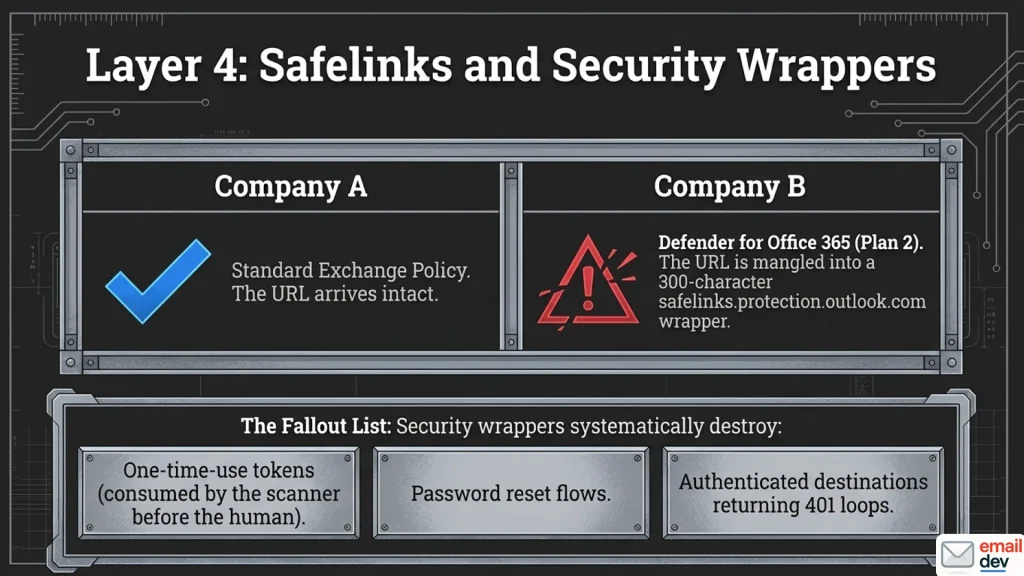
Microsoft Defender for Office 365 rewrites URLs in inbound mail. They become safelinks.protection.outlook.com wrappers, so the destination can be checked at click time rather than only at delivery.
Note the licence dependency. This needs Defender for Office 365 Plan 1 or Plan 2. Plain Exchange Online Protection doesn’t include it.
That single fact explains a lot of confused support tickets. Two recipients at two different companies get completely different behaviour from the identical email. One sees your URL. One sees a wrapper 300 characters long.
Documented failure modes, and these are the ones that actually cost money:
- One-time-use and tokenised URLs consumed by the scanner before the human clicks
- Password reset flows breaking for the same reason
- Authenticated destinations returning 401 or 403 in a loop
- Very long URLs getting mangled in the wrapping
Safe Links also doesn’t rewrite URLs in S/MIME-signed or encrypted messages, which is occasionally the explanation for inconsistent behaviour inside one company.
And it isn’t only Microsoft. Mailchimp’s own broken-links article describes aggressive corporate and academic spam filters breaking their tracking code, which sends the recipient to a Mailchimp static page instead of your destination. Different vendor, identical shape of problem.
What you can and can’t do about it from the sending side
Honest answer: mostly you can’t. Pretending otherwise would be a lie and you’d find out within a week.
What you can do:
- Keep URLs short and structurally simple
- Avoid one-time tokens in bulk email where a plain login link would work
- Don’t put anything in a link that breaks if it’s requested twice
- Know the vocabulary well enough to give the recipient’s admin something useful
That last one is the real deliverable. Two things their admin can act on:
Safe Links policies include a “Do not rewrite the following URLs in email” list. There’s also a policy setting, “Do not rewrite URLs, do checks via Safe Links API only”, which leaves the original URL alone and runs the time-of-click check through the Safe Links API instead.
Worth knowing before you ask: per Microsoft’s own PowerShell reference, that setting (DisableUrlRewrite) defaults to on in new Safe Links policies created in the Defender portal, but defaults to off in PowerShell. So whether your recipient’s tenant already has it depends on how their policies were built, and their admin may not know which.
Note the tradeoff, because their security team will ask. The API-only check works in supported Outlook clients, and Microsoft’s docs currently name Outlook for Windows and Outlook for Mac. Outside those, an unwrapped link isn’t getting the click-time check.
You’re not asking them to turn off security. You’re asking them to change how it’s applied to your domain. That’s a much easier conversation.
The clicks that no human made
Security gateways click every link in your email before the recipient sees it. Including the unsubscribe. Including the privacy policy.
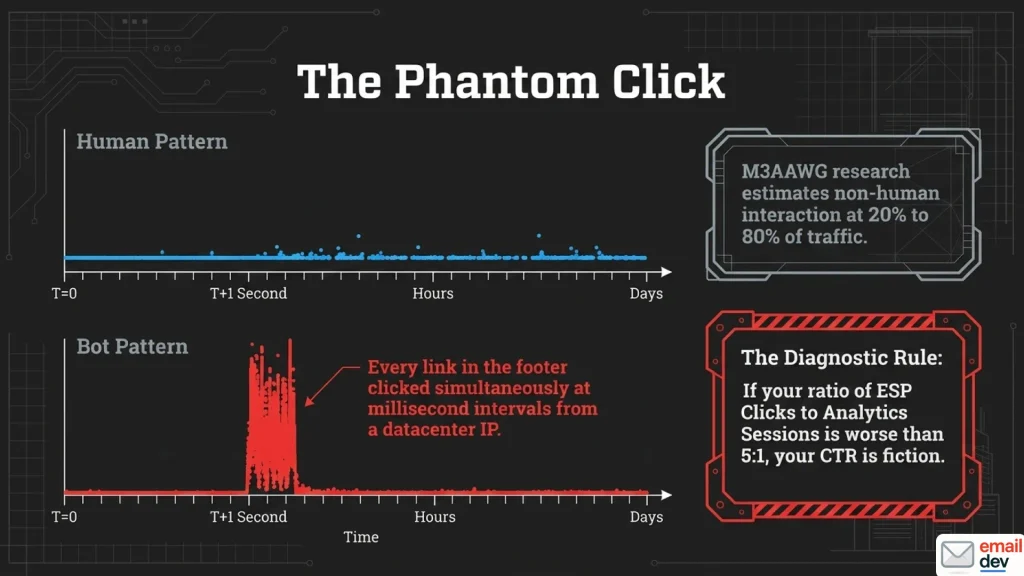
This is not a fringe problem. M3AAWG’s research on non-human interactions found overall impact somewhere between 20% and 80%, with B2B far worse than consumer mail. Their own conclusion is worth quoting in spirit rather than word: it’s hard to quantify, because filter vendors deliberately mask detection so their filters can’t be circumvented.
For a concrete number from the other end: the team at EmailToolTester turned on Brevo’s bot filtering for their own newsletter and watched their reported click-through rate fall by 9.4%. Nothing changed except the honesty of the number.
The tells are consistent:
- Multiple clicks on a single URL within seconds
- Systematic clicks across every footer link, in order
- Abnormal activity on the privacy policy and terms links
- Clicks landing within a second or two of delivery, from datacentre IP ranges
If you want to measure it rather than guess, the honeypot trick works: put a link in the email in the same colour as the background, so no human will ever see it, and see whether it registers clicks. Scanners crawl the HTML, not the render. They find it every time.
Consequences worth naming out loud:
- Your CTR is fiction, and comparing it to a benchmark is meaningless
- A/B tests get decided by whichever variant went to more corporate domains
- Automations fire on people who never touched anything
- A scanner hits your opt-out link and unsubscribes a subscriber for them
The detection rule I use: compare ESP clicks to analytics sessions for the same campaign. If the ratio is worse than roughly 5:1, something is wrong. That’s my own rule of thumb, not anybody’s research. It’s crude. It works. It takes four minutes.
ESPs also differ in whether they filter bot clicks and how aggressively, and several have changed their filtering with no announcement anyone noticed. So cross-platform CTR comparisons are worse than useless. They’re confidently wrong.
One-click unsubscribe, which is a link, and which is probably broken
Here’s the one that catches people who’ve done everything else right.
Gmail and Yahoo have required RFC 8058 one-click unsubscribe from bulk senders since the February 2024 sender requirements, with Google setting June 1, 2024 as the date for having it in place and ramping up enforcement on non-compliant traffic from November 2025. Microsoft extended the same requirement to Outlook.com, Hotmail and Live addresses in May 2025. Bulk means roughly 5,000 messages a day to personal Gmail accounts.
It needs two headers. List-Unsubscribe containing an HTTPS URI, and List-Unsubscribe-Post: List-Unsubscribe=One-Click.
Now the part that breaks things. The mailbox provider sends an HTTPS POST to that endpoint. From its own infrastructure. No browser, no cookies, no session, no human.
So all of the following fail while looking completely fine when you click them yourself:
- An HTTP endpoint instead of HTTPS
- A generic URL with no per-recipient token
- A confirmation page in the response
- Anything requiring a login or a session
- Referer-checking or CORS middleware rejecting the request
- A non-idempotent endpoint that errors on a retry
- A slow synchronous handler that times out
- Headers sitting outside the DKIM signed scope
Google asks for requests to be honoured within 48 hours. Yahoo additionally wants a visible unsubscribe link in the body, not just headers, and CAN-SPAM wants one regardless.
Test it with an actual POST. Curl it. Clicking it in a browser tests a different code path entirely, which is precisely why this stays broken in so many setups.
Effort: moderate. Worth doing this week rather than after Gmail starts counting it against your reputation.
Layer five: the client broke it
The section I’d want somebody to send me. Client-layer broken links in email are the ones that survive testing, because the code is fine and the routing isn’t.
The two-href button
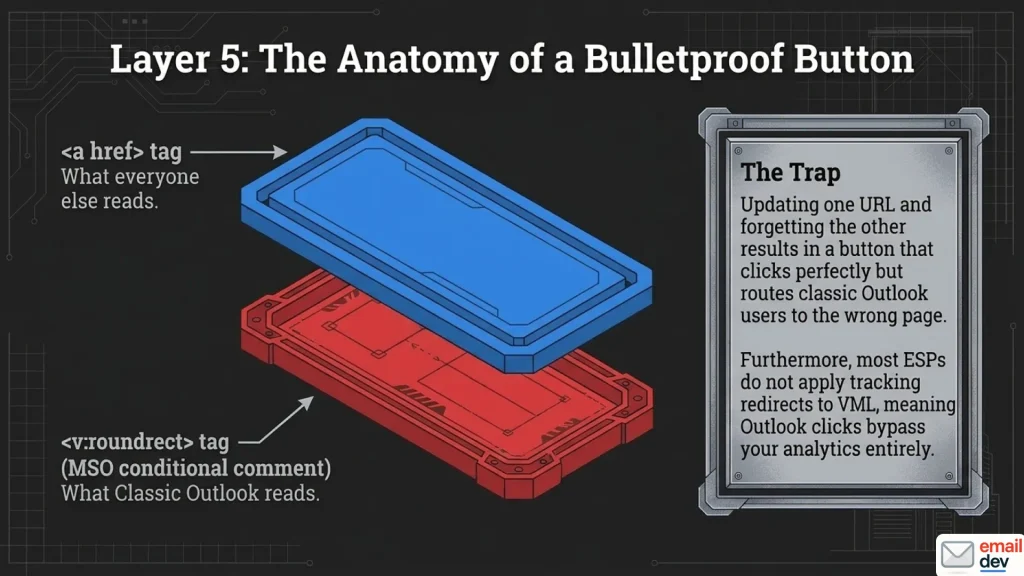
A bulletproof button carries two URLs.
There’s the href on the <v:roundrect> inside the MSO conditional comment, which is what classic Outlook for Windows reads. And there’s the href on the <a>, which is what everybody else reads.
Update one. Forget the other. Now you have a CTA that goes to the right page for most of your list and the wrong page in classic Outlook. It renders correctly. Clicks. But it just arrives somewhere else.
Then there’s the second problem, which is worse because it hides the first.
Several major platforms don’t apply click tracking to the URL inside the VML block. Marketo is the documented case – Sanford Whiteman wrote it up years ago, and the reason is structural rather than a bug: Marketo only rewrites <a href> attributes, not the very non-standard <v:roundrect href>. You can’t sensibly rewrite every href in a document, which is a fair position for a platform to take, and it still leaves you with untracked Outlook clicks. Users of other platforms have reported the same shape of problem in their own community forums. The pattern is old and well documented in those threads, and almost entirely absent from articles about broken links in email.
So the Outlook click either doesn’t register at all, or it bypasses your tracking domain completely and goes straight to the raw destination.
The diagnostic tell: a CTA that works everywhere except classic Outlook, or a B2B click count that looks mysteriously low, means checking the VML href before you check anything else.
The fix
One source of truth for the URL. If your platform supports variables, define the destination once and reference it in both places. If it doesn’t, put a comment above the VML block and add “check both hrefs” to your pre-send checklist.
Effort: quick. Ten seconds per button. Retire by: not soon. Microsoft says classic Outlook stays supported at least through 2029 for perpetual and subscription installs, and the opt-out stage that makes new Outlook the default has already slipped once.
Worth being straight about the scale here. Classic Outlook’s Word-based engine is a shrinking share of opens globally, and I’m not going to pretend every email problem traces back to it – that habit is a decade out of date and it makes email developers sound like we’re still fighting 2013. But it stays overweighted in corporate and enterprise lists, which is exactly where a wrong CTA destination costs the most. The check is cheap. Keep doing it.
Also: ESP behaviour varies, and it changes. Test it with your own platform before assuming you’re covered.
Gmail turning things into links you didn’t ask for
Bare URLs, email addresses and phone numbers get auto-linked in Gmail. Blue, underlined, whether you wanted it or not.
Fine, until it lands in a footer you spent time colouring. The workaround is a soft hyphen entity inserted into the string so the pattern matching doesn’t fire.
It’s a hack, it works, and I’ve written it up properly over on the Gmail rendering issues page. Moving on.
Links that go to the app, and then nowhere useful
This is the one almost nobody in email writes about, and it might be the most expensive item on this page.
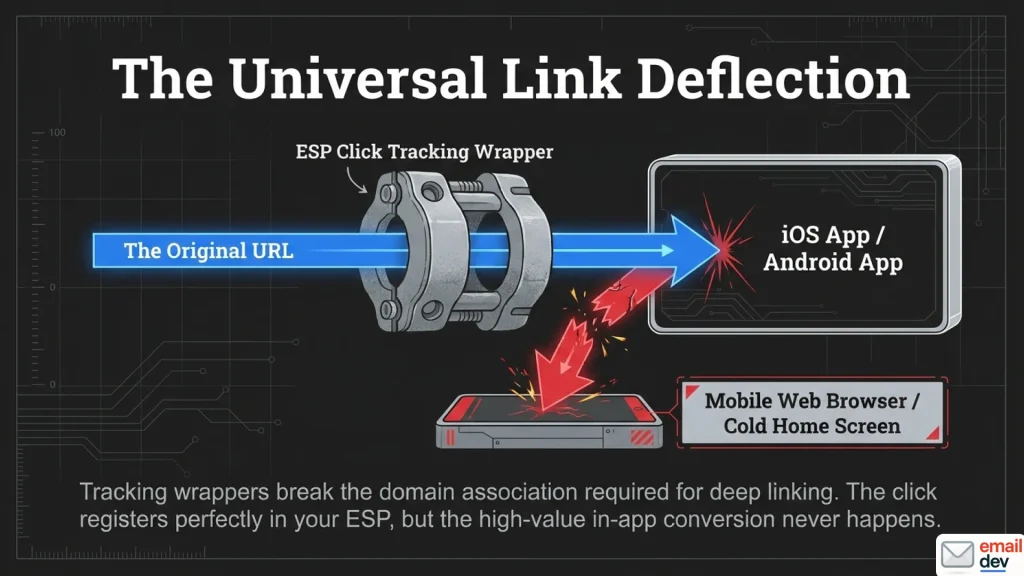
Every major ESP wraps your links in a tracking redirect. Braze, Klaviyo, Customer.io, Emarsys, Sailthru, Amazon SES – the mechanism is the same everywhere.
That redirect breaks the domain association that iOS Universal Links and Android App Links rely on. Instead of opening your app on the correct screen, the link falls back to mobile web. Or it opens the app cold, with no context, on the home screen.
This is documented in the places you’d only look if you already suspected it. There’s an AWS re:Post thread about SES wrapping links so iOS never fetches the AASA file. Adjust’s integration docs say the same thing about Klaviyo in plain language: Klaviyo wraps every link with its click-recording redirect, and that redirect stops iOS resolving universal links properly.
Your click registers perfectly. Your in-app conversion doesn’t happen. Nothing in your email reporting shows a problem at all.
If you have an app and email drives in-app behaviour, ask your mobile team whether ESP link wrapping is breaking your routing. Most of them already know and assumed you did too. Deep-linking providers offer link resolution that unwraps the tracking URL back to the original, and most ESPs let you exclude specific links from click tracking – which is the crude fix, and costs you the click data on exactly the links you most want data about.
Effort: expensive, and not yours to fix alone. Knowing it exists is still worth the paragraph.
Blocked images, image-only CTAs, and the click that can’t happen
Brief and blunt.
A button that is an image is a CTA that disappears when images are blocked. Padded table cells with a background colour, always. Never an image of a button.
The pillar covers bulletproof button construction properly. I’m not re-teaching it here.
Layer six: the broken links in email that were fine when you sent them
Link rot is faster than you think
The dullest cause of broken links in email is also the most inevitable. Pew Research Center’s May 2024 analysis sampled nearly a million pages from Common Crawl and found that 38% of webpages that existed in 2013 were no longer accessible a decade later. A quarter of everything sampled between 2013 and 2023 was gone as of October 2023.
But the number that matters for email is smaller and scarier. Pew found that 8% of pages that existed in 2023 had already gone by the time they checked, later that same year.
Eight percent. Inside twelve months, and probably a lot less than twelve.
Ahrefs, using a different method across roughly two million domains, puts the figure far higher – closer to two thirds of links dying over a nine-year window. Methodologies differ enormously here and I’d use Pew’s, because it’s the conservative one and it’s the one that survives scrutiny.
Either way, the implication is the same. Your evergreen welcome sequence is decaying while you sleep.
The automations nobody re-reads
Broadcast campaigns get proofread by three people. Automated flows get written once and left running for three years.
Every product link, blog link, webinar registration and partner URL in those flows is quietly rotting. Nobody is checking, because nobody owns them after launch.
Schedule a flow link audit. Quarterly for a big programme, twice a year for a small one. Put it in a calendar, not in your good intentions. Broken links in email that live inside automations are the ones that damage you longest, because they fail one subscriber at a time and nobody complains.
Redirect chains and shorteners
Redirect chains get longer over time. Somebody bolts on a new redirect, then somebody else adds a campaign parameter layer, and now you’re three hops deep.
Filters dislike chains. Each hop adds latency. Each hop is another thing that can break independently.
Public shorteners are a worse trade, and the detail here is more interesting than the folklore. Spamhaus doesn’t put shorteners in the main DBL block zone – they created a separate URL shortener and redirector zone with its own return code, 127.0.1.103, precisely because blocking them outright would cause too many false positives. Their own guidance is to use it as a weight in a filter, not as a block. Which sounds reassuring until you remember that a weight is still a weight, that plenty of corporate gateways are less nuanced than Spamhaus, and that masking a destination is a well-known phishing signal on its own merits.
There’s also the part people forget. A shortener is a third party who can expire your link, shut down, or get blocklisted after you’ve already hit send.
Branded short domains on your own infrastructure are fine. bit.ly in a marketing email is just a bad decision.
Effort: quick. Mostly a policy call rather than a technical one.
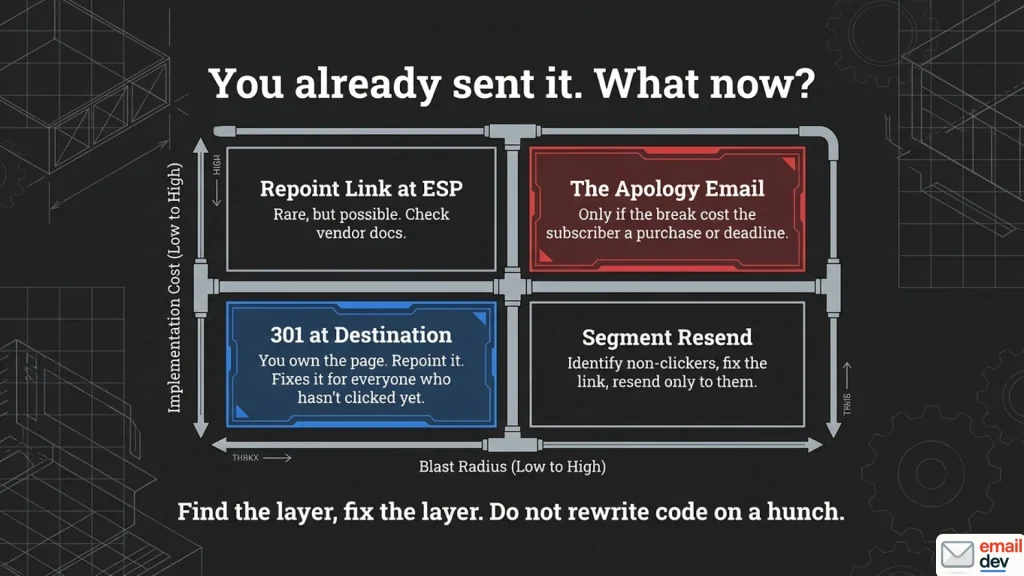
You already sent it. What now.
The panic section, for broken links in email that are already sitting in three thousand inboxes. Bookmark it before you need it, not during.
The four routes, in order of how much you’d rather use them
| Route | When it works | Cost | Blast radius |
|---|---|---|---|
| 301 at the destination | You own the URL | Minutes | Everybody who hasn’t clicked yet |
| Repoint the link at the ESP | Rare. Check, don’t assume | Minutes | Same, where it exists |
| Resend to non-clickers | Any time | One send | Smaller segment |
| Correction email | Last resort | One send, some dignity | Whole list |
1. Redirect at the destination. You own the page, so 301 it to the right one. Cheapest option, invisible to the subscriber, fixes it for everyone who hasn’t clicked yet. Watch for redirect loops. Don’t hand-edit server config files if you’re not confident, because a broken redirect is worse than a broken link.
This is the answer far more often than people expect, and it’s the one to reach for first.
2. Change the link at the ESP. In theory, since every click routes through the platform’s redirect first, the platform could repoint it. In practice, hardly any of them will. Klaviyo’s support answer to exactly this question is a flat no, with the recommendation to set up a redirect on your own site instead. Older systems used to offer it and mostly don’t now. Check your platform’s documentation while nothing is on fire, and if the answer is no, at least you’ll know before the day you need it.
3. Resend to non-clickers only. Segment on the broken link, resend to people who didn’t click it. Smaller audience, less noise, no public admission.
4. The correction email. Only if the broken link cost the subscriber something real. A deadline, a purchase, an access link to something they’d paid for.
When not to send the apology email
The “oops” email is a reflex, and it’s usually the wrong one.
It costs you a send. It draws attention to a mistake most of your list never noticed. And nine times out of ten it’s written for the sender’s comfort rather than the reader’s benefit.
If the broken link was a footer link to your blog, let it go. Fix it silently and get on with your day. Your subscribers are not keeping score of your CTA hygiene.
The post-mortem worth five minutes
Three questions, and then stop.
- Which layer did it break at?
- What check would have caught it?
- Is that check on the pre-send list now?
Everything past that is self-flagellation, and it doesn’t scale.
How to test for broken links in email before you send
A link testing order that catches most of it
Do these in order. The early ones are free and they catch the majority of broken links in email before you’ve spent anything.
- Browser first. Open the HTML, click everything. Thirty seconds, catches typos and structural mistakes.
- Real send from inside your ESP. Click every link in the received message. This is the version with tracking rewrites applied. Not a forward – forwarding rebuilds the HTML.
- Check the raw source of that send. Look for encoding damage, a stray
=inside an href, and confirm the tracking domain is what you think it is. - Check both hrefs on every VML button. Ten seconds each. Nobody has this check. Everybody eventually needs it.
- Open it in classic Outlook and click the CTA. Not look at it. Click it.
- Automated link check for status codes, redirect chains and destination reputation. After the manual pass, not instead of it.
- POST-test the unsubscribe endpoint. An actual POST. No browser.
- The unglamorous list. Preference centre, view-in-browser, every footer link, and the plain-text version, which has its own links and its own problems.
Steps one through five cost nothing but attention. Which is the point.
What the automated checkers are actually doing
Worth understanding before you trust one, because the mechanism explains the false positives.
Litmus documents theirs openly: the link check makes a web request without a browser, something like curl, and looks for a success response. It doesn’t execute JavaScript, so it won’t follow a JavaScript redirect. Their own help centre has an article about Marketo links being flagged as failures for exactly that reason, when the links are fine.
So you get two failure modes in opposite directions. A working link reported as broken, because the checker can’t follow the route a browser would. And a broken link reported as working, because a 200 came back from the wrong page.
That’s the honest picture. These tools are still worth having. Just don’t confuse “the checker is green” with “the links are right”.
Tools and prices, checked recently
Pricing in this category has moved a lot, and it moved again while I was writing this, so treat any figure here as something to verify rather than something to plan a budget on.
| Tool | Price | What you get for link QA | Who it’s for |
|---|---|---|---|
| Litmus | Quote only | Link validation inside the QA suite, unlimited previews and seats. Link monitoring is a paid Email Guardian upgrade | Enterprise and larger in-house teams |
| Mailgun Inspect Basic | $99/month | Link and image validation, 1,000 previews, unlimited users, $0.15 per preview overage | Freelancers and small teams |
| Mailgun Inspect Premium | $199/month | 2,000 previews, plus accessibility and code analysis | Teams wanting QA automation |
| Built-in ESP checkers | Included | Mailchimp has a link checker in preview mode. Check whether yours does | Everybody, with caveats |
| Free HTML link checkers | Free | Status codes, some screenshot each destination | Catching the obviously dead ones |
| Mailtrap | From around $17/month | SMTP sandbox, pipeline testing | Developers testing in staging |
| Mailosaur | From around $20/month | Automated inbox testing via API | Anyone testing inside CI |
| Clicking them yourself | Free | Everything an automated checker can’t do | Everybody, always, first |
On Litmus
This one needs the history, because half the internet is still quoting an old number. Validity acquired Litmus in April 2025. On August 1, 2025 the $199/month Plus plan quietly became Core at $500/month – a 151% jump, no blog post, no announcement – and the $99 Basic tier disappeared entirely. Then in February 2026, at Litmus Live, Validity launched Engage and moved Litmus to an unlimited model. The public pricing page no longer lists a monthly figure at all. It’s contact-sales, with unlimited previews and unlimited seats, and Deliverability, Email Guardian, Sender Certification, Competitive Intel and Mailcharts sold as upgrades on top.
For link work specifically, the relevant upgrade is Email Guardian, which monitors live emails and flags broken links and image problems after the send rather than before it. That’s a genuinely different product from a pre-send checker, and if you’re running a big automated programme it’s the thing on this list that maps to the flow-rot problem in layer six.
My read: this is now an enterprise tool with enterprise procurement attached. Fine if that’s you. If you’re one person sending a newsletter, it isn’t, and I’m not going to pretend otherwise.
On Email on Acid
Most articles haven’t caught up with this. Email on Acid is becoming Mailgun Inspect. Subscription customers began transitioning in June 2026, and annual plans migrate at the end of their current term. Basic is $99/month with 1,000 previews, Premium $199 with 2,000, $0.15 per preview overage on both. The old unlimited previews pitch is gone – though you now get unlimited users instead, which for a small team is arguably the better trade. Link validation and image validation are both included, which is the relevant bit here. The Analytics feature didn’t make the move.
On Putsmail
Retired. Gone. Older tutorials still link to it, so better you hear it here than after ten minutes of clicking.
A caveat on all of them
An automated link checker verifies that a URL returns a 200. It cannot tell you the 200 is the wrong page. For link QA specifically, the human pass is not the cheap version of the tool. It’s the part the tool can’t do.
The honest tiering
- One email a month, small business: a browser, a real test send, and ten minutes of clicking. You do not need a subscription. Link checking is the one part of email QA where manual effort genuinely scales fine at low volume.
- Weekly sends, one person: a free or cheap link checker plus the pre-send list below. Add Mailgun Inspect if you need rendering coverage too.
- Agency or a real in-house programme: automated checking as a pipeline step, plus post-send monitoring on your automated flows. At volume the failure mode isn’t skill, it’s attention, and attention doesn’t scale.
I’d rather say the first one clearly, in the section where I recommend paid tools. A recommendation is only worth something if it can go the other way.
The link pre-send checklist
Twelve items. Screenshot it, print it, tape it to something.
- Every URL absolute, with
https:// - Anchor text and destination cross-checked, one by one, by a human
- Both hrefs checked on every VML button
- Real send from inside the ESP, links clicked in the received message
- Raw source checked for encoding damage inside hrefs
- Tracking domain resolving, SSL valid, no HTTP links anywhere
- UTM parameters correct and consistently named
- No public shorteners
- Redirect chains no longer than one hop
- Unsubscribe endpoint POST-tested, returns 200, idempotent
- View-in-browser, preference centre and footer links all checked
- Plain-text version links checked separately
What changes about email links over the next five years
Predictions with confidence levels attached, because the causes of broken links in email shift faster than the fixes do. I’d rather be specific and occasionally wrong than vague and unfalsifiable.
High confidence: more of your links get rewritten, not fewer. Security gateways, tracking domains, privacy proxies, AI assistants. The URL a subscriber clicks is increasingly not the URL you wrote. There’s no counter-pressure on that trend anywhere.
High confidence: click data keeps degrading as a metric. Bots already dominate some corporate segments. Clicks are going where opens went after Apple’s Mail Privacy Protection arrived in September 2021 – still directionally useful, useless as a precise number. Build reporting that doesn’t depend on click precision, and do it before you’re forced to.
Medium confidence: link QA becomes an automated pipeline step rather than a human ritual. It’s the most automatable part of email testing and the least glamorous. That’s exactly the profile of a thing that gets automated. The wrong-page problem stays human, though.
Medium confidence: agent-mediated clicks become a measurable share of traffic. If an assistant follows a link on the recipient’s behalf, that’s a click no human made, layered on top of the scanner problem. Crawlers tied to AI tools have already been observed following links in email bodies, and at least one benchmarking write-up puts AI-bot clicks in the millions per day during early 2025. I don’t have good independent measurement on the scale of this and I’m flagging it as a guess rather than a finding.
Low confidence, but watching: deep-link routing gets fixed properly. The ESP wrapping versus Universal Links conflict has been solvable for years – the deep-linking vendors already sell the fix. Nobody’s commercially motivated enough to make it the default. I’d like to be wrong about this one.
The constant: the destination will keep disappearing. Eight percent of pages inside a year, on the conservative measurement. No standard, no vendor and no tool is going to fix that for you. Audit your flows on a schedule or accept the decay.
FAQ about broken links in email
Why do links in my email go to a 404 when they work in my browser?
Usually because the link you tested isn’t the link that was sent. Your ESP rewrites every trackable href into a redirect at send time. Relative paths and URLs missing https:// break during that rewrite. Test by clicking links in a received message from a real send, not in your local HTML file.
Can I fix a broken link after the email has already been sent?
Usually only one way: if you own the destination, add a 301 redirect to the correct page. Repointing an already-sent tracking link inside the ESP sounds like it should be possible, since clicks route through their redirect first, but most platforms don’t offer it – Klaviyo, for one, says outright that it can’t be done and points you at a redirect on your own site. Failing both, resend to non-clickers. Save the correction email for when the broken link genuinely cost someone something.
Why does my email link have a strange safelinks.protection.outlook.com address in it?
That’s Microsoft Defender for Office 365 rewriting the URL so it can be scanned at click time. It requires Defender Plan 1 or 2, so behaviour varies by recipient. It can break one-time tokens, password resets and authenticated destinations. The recipient’s admin can exclude your domain, or switch the policy to API-only checks that leave the URL unwrapped.
Why is my button clickable in Gmail but not in Outlook?
Check the VML. A bulletproof button carries two URLs – one on the <v:roundrect> inside the MSO conditional comment, one on the <a>. Classic Outlook reads the VML one. If you updated only the anchor href, Outlook goes somewhere else entirely, or nowhere. It’s one of the most common broken links in email that testing tools miss.
Do link shorteners hurt email deliverability?
Public ones can, yes. Spamhaus keeps abused shorteners and redirectors in a dedicated zone of its domain blocklist rather than the main block zone, which means most filters weight them rather than blocking outright – but plenty of corporate gateways are blunter than that, and masking a destination is a recognised phishing signal. You’re also trusting a third party not to expire or lose your link after you’ve sent. Branded short domains on your own infrastructure are fine.
Why are my click rates high but my website traffic low?
Almost certainly bot clicks from security scanners. M3AAWG’s research puts non-human interaction somewhere between 20% and 80%, concentrated heavily in B2B. Compare ESP clicks against analytics sessions for the same campaign. Worse than roughly 5:1 and you’re looking at scanner traffic, not humans. A hidden honeypot link in your next send will confirm it in one campaign.
Can I track clicks on a mailto: link?
Not with most platforms. Mailchimp documents plainly that clicks on mailto: and anchor links can’t be tracked, and most ESPs behave the same way. There’s no HTTP request to intercept. If you need the measurement, route the click through a redirect you control, then hand off to the mail client.
Why did my unsubscribe link stop working after Gmail’s bulk sender rules?
Because one-click unsubscribe sends an HTTPS POST from the mailbox provider’s servers, not a browser GET from a person. Confirmation pages, logins, Referer checks, HTTP endpoints and non-idempotent handlers all fail while looking fine when you click them. Test the endpoint with an actual POST request.
My links aren’t clickable at all in Outlook. Is that the same problem?
Probably not. If no links work anywhere in Outlook, that’s usually a local default-browser or registry issue on that machine, not your email code. Microsoft’s own support pages cover it. Nothing on this page will fix it, and I’d rather point you somewhere useful than pretend otherwise.
Where I’d start tomorrow
Find the layer, then fix the layer. That’s the whole method, and it handles the large majority of broken links in email without much drama.
When somebody sends me a screenshot of a dead CTA, I don’t open the HTML. I ask two things. Which client, and does the URL in the received message match the one you wrote?
Those two answers usually narrow six layers down to one before I’ve read any code.
The rest is discipline nobody enjoys. Absolute URLs. Both hrefs. A real send, not a forward. An audit of your flows on a schedule rather than on a whim.
And keep a note of which checks you’re running and why. That’s the part almost nobody does, and it’s how you stop repeating the same debugging session every eighteen months.
Got a CTA going somewhere it shouldn’t and can’t work out which layer broke it? Send me the HTML and the link. That’s the kind of puzzle I like.