There’s a scenario I’ve seen more times than I’d like. Launch day. The course is ready, the sales page is live, the email automation sequences for course creators are written and scheduled. The creator hits send on the cart-open announcement, watches the ESP (email service provider) dashboard, sees delivery numbers climbing, and thinks: good.
Then a subscriber sends a screenshot.
The “Enroll now” button is a blank white rectangle in the Gmail app on Android. Not broken-looking – just absent. A white box where a button used to be.
Or – and this one’s more insidious – the cart abandonment email for the course checkout never fires at all, because whoever set up the integration mapped the wrong event trigger, and nobody tested it end-to-end before launch week. Every person who visited checkout and didn’t buy just… left. No follow-up. Nothing.
These aren’t copy problems. They’re infrastructure problems.
Almost nobody talks about that when they write articles titled “7 sequences to 10x your launch.” The sequences that actually work aren’t just the right words in the right order – they’re systems that have to be wired together correctly, triggered correctly, tested correctly, and built before the pressure of a live launch makes careful thinking impossible.
This article isn’t about subject line formulas. There’s plenty of that content already. This is the structural map for email automation for online courses:
- Which 7 email automation sequences for course creators you actually need
- What each one does technically and strategically
- Where they typically break
- Which tools handle them well – and which ones don’t
What is an email automation sequence?
A triggered series of emails that sends automatically based on a subscriber’s action or status – as opposed to a broadcast email you manually send to your whole list. The trigger might be a form submission, a purchase, a link click, a period of inactivity, or a date. The sequence runs on its own once it’s built and activated.
The distinction matters because automation logic – not copywriting talent – determines whether the right subscriber gets the right email at the right moment. Or whether they get nothing. Or the wrong thing. Or the same thing twice because a trigger misfired.
- Why email automation sequences for course creators break before the copy matters
- Tools for email automation sequences for course creators
- Testing email automation sequences for course creators across email clients
- Sequence 1: the welcome sequence (email automation sequences for course creators start here)
- What a welcome sequence actually does
- The personalization angle most people miss
- Where welcome sequences typically break
- Sequence 2: the pre-launch nurture sequence (email automation sequences for course creators warm up here)
- What the pre-launch email sequence is actually for
- The behavioral tracking layer
- The timing problem
- A note on GetCourse specifically
- What “good” looks like at the end of this sequence
- Sequence 3: the launch sequence (the one with the most riding on it)
- The arc of a course launch email sequence
- Why the close-day emails matter so much
- Behavioral branching in the launch sequence
- The rendering problem during a course launch email sequence
- Sequence 4: the cart abandonment email course sequence (the sequence that quietly makes money)
- The email structure that works
- Where the abandoned cart sequence breaks technically
- A note on personalization here
- Sequence 5: the new student onboarding sequence (the sequence nobody thinks is marketing but absolutely is)
- The email structure that works
- The testimonial trigger
- Technical considerations by course format
- Sequence 6: the re-engagement email sequence (for the subscribers who went quiet)
- The apple mail privacy protection problem
- Why this sequence matters for deliverability, not just conversions
- The email structure
- Personalization in re-engagement
- Sequence 7: the post-launch evergreen nurture sequence (so the next launch is easier)
- The two branches
- The practical implementation
- Where inboxes and tools are going (and why this sequence matters more than it used to)
- The email rendering problem: why email automation sequences for course creators can break silently
- What’s actually happening under the hood
- The specific rendering risks in launch emails
- What ‘testing’ actually means
- The tools for email automation sequences for course creators
- A note on what’s changing in the next 2 to 3 years
- FAQ: email automation sequences for course creators
- Closing
- Quiz to test your knowledge
- Footnotes
Why email automation sequences for course creators break before the copy matters
The myth that persists in course creator circles is that email is fundamentally a writing problem. Write compellingly, send consistently, and the system takes care of itself.
I get why that belief is comforting. Writing is something you can control and improve. The alternative – where your launch revenue depends partly on whether your ESP is correctly receiving webhook events from your course platform – is not comforting at all.
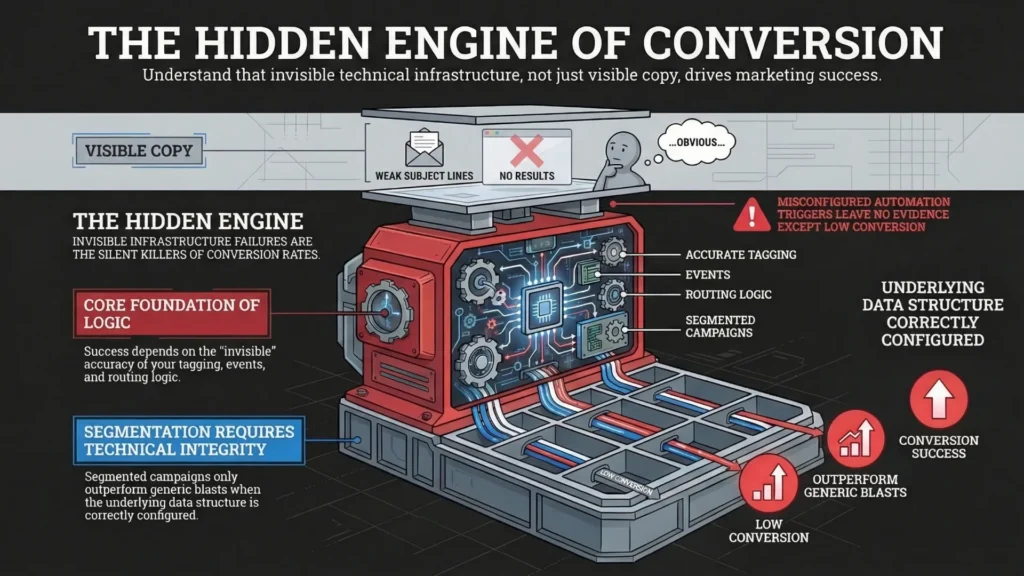
But infrastructure failures are harder to see than copy problems. A weak subject line is visible. A misconfigured automation trigger leaves no evidence except a conversion rate that’s lower than it should be, and no obvious explanation why.
Segmentation is a good example of this. The consistent finding (across ESP datasets and industry research) is that segmented campaigns outperform generic blasts on engagement, and sometimes by a lot – but those lifts only happen when your tagging, events, and routing logic are set up correctly. 1
Tools for email automation sequences for course creators
The tools aren’t equal, and it’s worth knowing what you’re working with before you build a course launch email sequence, a pre-launch email sequence, and the rest of the machine:
- Kit (formerly ConvertKit) – genuinely good for most creator use cases. Tag-based segmentation is clean, the visual automation builder is approachable, and the free plan is big (up to 10,000 subscribers) – but it’s also limited (for example: one automated sequence on the free tier).2
- ActiveCampaign – more conditional branching power, steeper setup curve, higher monthly cost. Worth it if you need sophisticated behavioral logic for ActiveCampaign course creators setups (deep tagging, lead scoring-style behaviors, lots of “if/else” paths).
- Kajabi – fine if you want everything in one place and your Kajabi email automation needs are straightforward. One correction though: Kajabi does support A/B testing for Email Broadcasts, so it’s not “no A/B testing” – it’s more that the automation depth is simpler than the heavy ESPs.3
- MailerLite – sits in the middle. Solid budget option with a capable automation builder for most re-engagement email sequence needs, unless you’re trying to build a logic monster.
- GetCourse – has its own email system with quirks you work around rather than through (relevant in certain markets, and relevant if you’re inheriting an existing setup you can’t easily swap out).
None of these tools will save you if the sequences aren’t built, configured, and tested before cart opens. The tool is almost secondary to that.
Testing email automation sequences for course creators across email clients
Your emails will look different depending on which client your subscriber uses to read them – and “different” sometimes means “completely broken.”
A few things that happen all the time, across common email clients:
- Gmail supports a lot of CSS now, but it will still ignore unsupported CSS – and the Gmail apps have their own edge cases (especially when a non-Gmail account is viewed inside the Gmail app).4
- Classic desktop Outlook for Windows uses Microsoft Word as a rendering engine, which is why it behaves like a stubborn document editor pretending to be a browser.5
- Background images via CSS don’t render in many Outlook desktop versions unless you use VML (or a fallback).6
- Buttons built as images disappear entirely when images are disabled (and some subscribers disable images by default).
- Dark mode can invert your brand colors in ways that make a carefully designed email look like it was assembled during a power outage.
- Apple Mail handles modern CSS reasonably well, which is great, except most lists skew heavily toward Gmail and Outlook in the real world.
There’s a lot more to say about all of this – there’s a whole section later on the rendering problem specifically. For now, just hold it in the back of your mind as context for why “I tested it in the preview and it looked fine” is not a testing strategy.
Alright. The sequences.
Sequence 1: the welcome sequence (email automation sequences for course creators start here)
Trigger: New subscriber opts in – lead magnet download, webinar signup, free challenge registration
Most course creators have a welcome sequence. Usually its one email. Sometimes two. It says something like “Hey, welcome, here’s your freebie, I’m so glad you’re here” and then – silence until the next broadcast goes out three weeks later.
That’s not a welcome sequence. That’s a receipt with a friendly tone.
A properly built welcome sequence course creator setup does several things at once – and most of them have nothing to do with how warmly you introduce yourself.
What a welcome sequence actually does
- Sets subscriber expectations – what you send, how often, what they’ll get out of being on your list
- Starts behavioral segmentation – who clicks what in these early emails tells you a lot about what they actually want from you
- Builds early engagement signals – inbox providers watch what new subscribers do with your first few sends (opens, clicks, replies). If your welcome emails get ignored, you are teaching the system “this sender is skippable”
- Begins the trust-building process before you ever ask for anything
The length that tends to work: 3 to 5 emails, delivered over 5 to 7 days. Not 14 emails in 8 days. Not one email and then a three-week gap.
The personalization angle most people miss
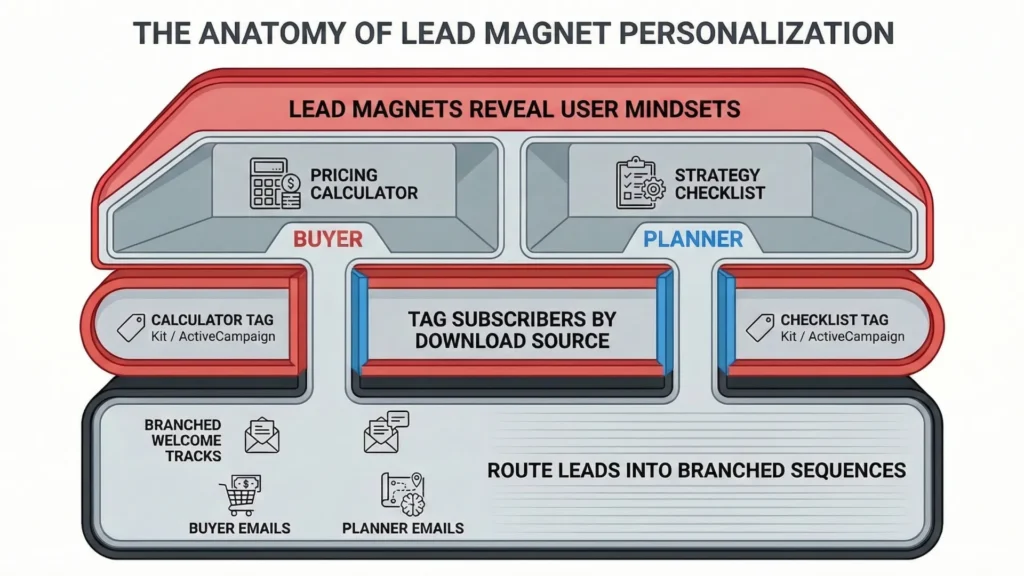
If you have multiple lead magnets – say, a “content strategy checklist” and a “pricing your course” calculator – the subscribers who downloaded each one are in completely different mindsets. Someone interested in pricing is likely closer to a buying decision. Someone interested in content strategy might still be trying to stop their content calendar from eating them alive.
Even at the welcome stage, you can start personalizing based on which lead magnet triggered the sequence. This is basic tagging and routing: tag by lead magnet source and route into slightly different welcome tracks. Kit (formerly ConvertKit) and ActiveCampaign both support this kind of “tag then branch” setup.7
The copy doesn’t have to be radically different. The angle shifts.
This is where the foundation for later email personalization course launch work gets built. If you skip it here, you’re sending the same cart-open announcement to someone who downloaded a beginner freebie six months ago and someone who’s been clicking every advanced tutorial you’ve sent since week one. Those are not the same email.
Where welcome sequences typically break
A few things I see go wrong repeatedly:
- The duplicate sequence problem. An existing subscriber re-downloads your lead magnet and gets the entire welcome sequence again – including the “great to meet you” opener. This happens when the automation doesn’t check for “already subscribed” or doesn’t gate entry with a tag/condition. How you fix it depends on the ESP, but its worth checking before assuming its handled
- The from-name mismatch. Welcome emails that come from a different sender name than your regular broadcasts confuse subscribers and can quietly tank recognition
- The “reply to this email” instruction that goes nowhere. If you tell subscribers to reply with their biggest question and the replies land in an inbox nobody checks, that’s a trust problem waiting to happen
Affiliate note: Kit’s tag-based setup makes welcome flow branching pretty painless, especially if you’re building ConvertKit sequences for a course from scratch. The visual builder helps you see the logic instead of mentally juggling it.
Sequence 2: the pre-launch nurture sequence (email automation sequences for course creators warm up here)
Trigger: Subscriber has been on list for 2 to 4 weeks, or specifically tagged as interested in your course topic
Length: 5 to 10 emails over 3 to 6 weeks before your launch announcement
This is the sequence most course creators either skip entirely or do halfheartedly – a few broadcast emails that go to everyone, loosely themed around the course topic, sent whenever there’s time.
That’s not the same thing.
What the pre-launch email sequence is actually for
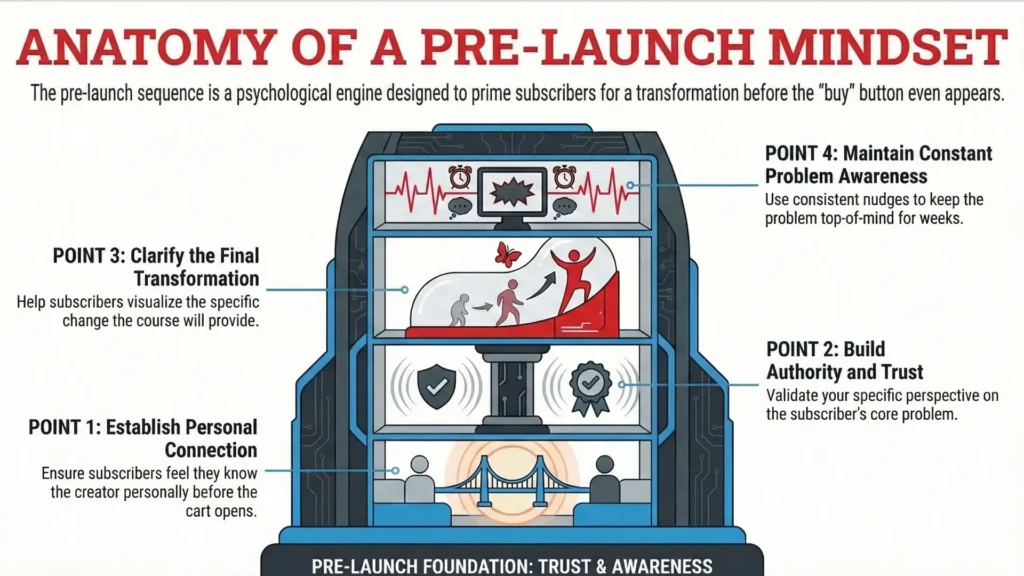
The goal is simple in concept and annoying in execution: by the time cart opens, the subscribers in this sequence should already feel like they know you, trust your read on the problem, and understand what kind of transformation your course is built around.
“By the time cart opens, you want your subscriber to feel like they’ve been thinking about this problem for weeks – because they have, because your emails kept nudging them back to it.”
The content types that tend to work in a pre-launch email sequence:
- Case studies – specific results, real numbers where possible, anonymized where necessary
- “Here’s what I got wrong for years” – this framing tends to get more replies and forwards than clean how-to content, because its specific and messy in a way people recognize
- Answered subscriber questions – if you’re collecting replies (or getting questions elsewhere), surfacing them here builds the sense of an ongoing conversation
- Free mini-lessons related to the core transformation your course promises
- Behind-the-scenes of what you’ve figured out, built, or tested – not “content marketing”, just actual context
The behavioral tracking layer
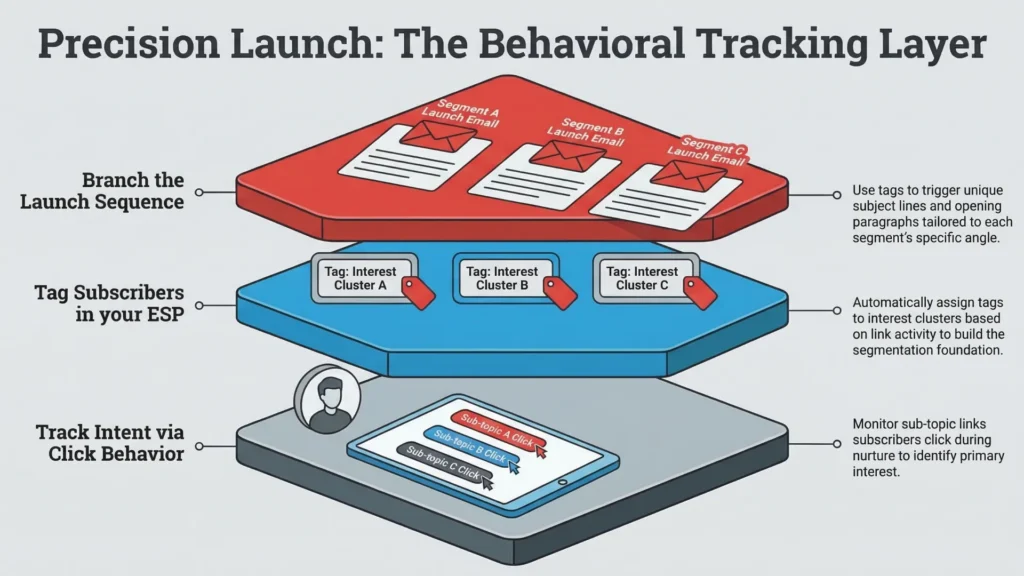
This is where email personalization for course launches starts to get useful.
Track which links subscribers click in these nurture emails. Someone who clicks every link about one specific sub-topic is basically underlining the angle they want you to lead with when the course launch email sequence starts.
In practice:
- Tag subscribers based on click behavior in your ESP
- Use those tags to branch the launch sequence – different opening angles for different interest clusters
- The copy doesn’t need to be fully rewritten for each segment; sometimes its just the subject line and the first paragraph that shifts
ActiveCampaign for course creators shines here because branching and conditions are native to the automation builder. Kit can do it with tags and multiple paths – slightly more manual, still very workable.8
The timing problem
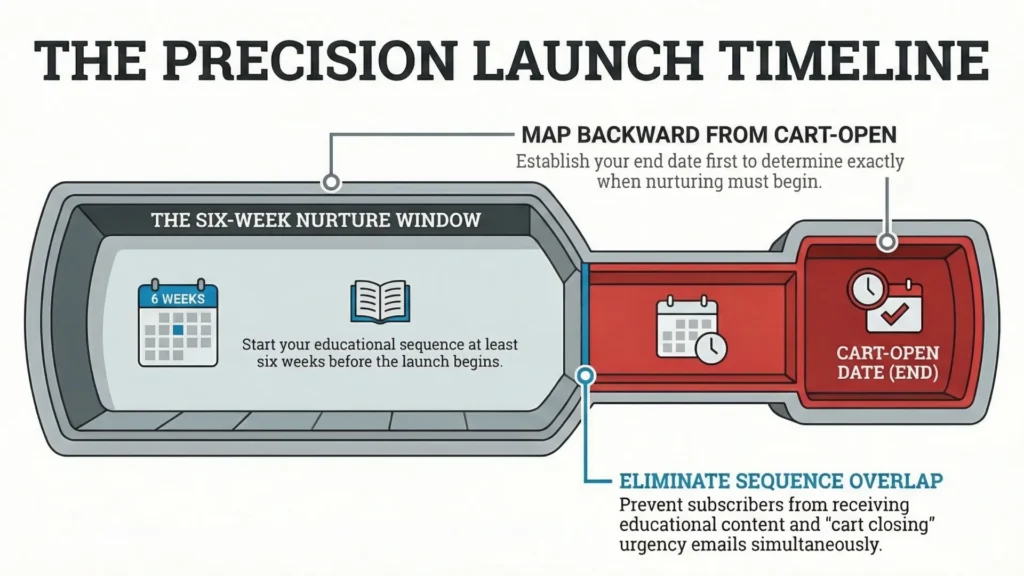
The pre-launch nurture sequence needs to be mapped backward from your cart-open date. If launch is six weeks out, this sequence starts now – not when you remember to start it.
A common mistake: the nurture sequence overlaps with the launch sequence because the timing wasn’t planned in advance. Subscribers start getting a warm educational email and a “cart closes tomorrow” urgency email on the same day. Not a great experience.
Build a simple calendar. Backward from cart close:
- Cart close – final day sequence fires
- Cart open – launch sequence starts
- 1 week before cart opens – nurture sequence ends, transition email goes out
- 3 to 6 weeks before that – nurture sequence runs
- Before that – welcome sequence has already done its job
A note on GetCourse specifically
If you’re running on GetCourse (common in parts of Eastern Europe), yes, it has native email and funnel tooling. You can build processes, run funnels, and even send emails based on order status (including chasing unpaid orders).9
Where people start feeling boxed in is when they want deeper behavioral personalization – lots of branching, click-based routing, and the kind of “if they did X, wait Y, unless Z happened” logic that dedicated ESPs are built for. In that case, the more reliable pattern is: use GetCourse for course delivery and student management, and run email automation for online courses through a dedicated ESP via integration. More moving parts, but more control.
What “good” looks like at the end of this sequence
Before the cart-open announcement lands, a well-executed pre-launch nurture sequence will have done this:
- Established your expertise through specific, experience-based content (not “here are 5 tips”)
- Started tracking behavioral signals that can personalize the launch sequence
- Built consistent engagement (clicks, replies) so your list isn’t ice-cold when sales emails start
- Made the course feel like a natural next step rather than a sudden pitch
Subscribers who’ve been through a proper pre-launch nurture sequence often buy at higher rates – not because the copy is magic, but because the relationship was built before the ask arrived.
Sequence 3: the launch sequence (the one with the most riding on it)
Trigger: Cart opens – enrollment begins
Length: 8 to 14 emails across the launch window (typically 5 to 10 days)
This is the course launch email sequence that gets the most attention and – in my experience – the most last-minute panic. Creators spend weeks on the course, days on the sales page, and approximately one frantic evening on the email sequence thats supposed to actually sell it.
The irony is that the launch sequence is the one place where sloppy setup has the most immediate financial consequences. A misconfigured trigger in your welcome sequence is annoying. A broken button in your cart-close email on the final day of a launch is a different category of problem.
The arc of a course launch email sequence
A launch sequence is not just a pile of “buy my course” emails sent at irregular intervals. Theres a structure to it, and the structure matters:
- Cart-open announcement – whats available, what it costs, how long the window is open. Direct and clear. This is not the place for a slow build.
- Whats inside – curriculum reveal – specific detail about what students actually get. Not “youll learn everything you need” – actual modules, actual outcomes.
- Social proof – student results, testimonials, specific transformations. If you have numbers, use them. If you dont have numbers yet, specific stories beat vague endorsements.
- FAQ – objection handling – the questions your audience actually asks: “Is this right for me if Im just starting out?” “How long will I have access?” “What if I fall behind?” Answer them directly, in email, before they become reasons not to buy.
- Scarcity – deadline reminder – real scarcity only. If the cart genuinely closes, say so clearly and remind people as it approaches. If the deadline is fake, subscribers will figure it out and it damages everything that comes after.
- Final day sequence – 2 to 3 emails on close day alone.
Why the close-day emails matter so much
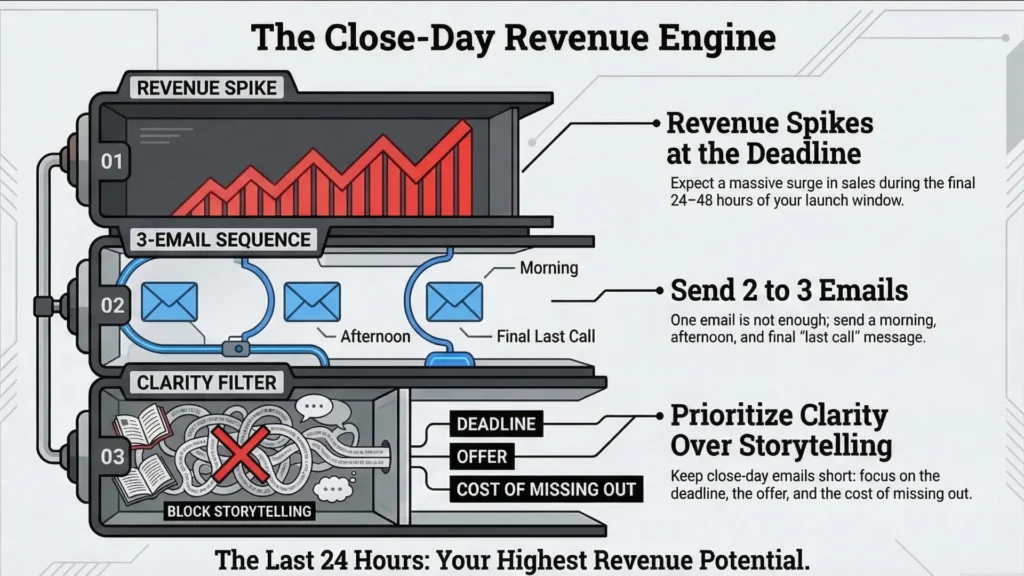
This is consistently where the revenue often concentrates. I wont pretend theres one universal percentage (there isnt), but if you read enough launch debriefs, you see the same pattern: a big spike in the last 24-48 hours is normal when theres a real deadline.10
If you send one email on close day, youre usually leaving money on the table. Two emails – a morning send and an evening send a few hours before close – is a reasonable minimum. Three is not excessive for a significant launch.
The close-day emails dont need to be long. They need to be clear about the deadline, clear about what the subscriber gets, and clear about what happens if they miss it. Thats it. Save the storytelling for the middle of the launch window.
Behavioral branching in the launch sequence
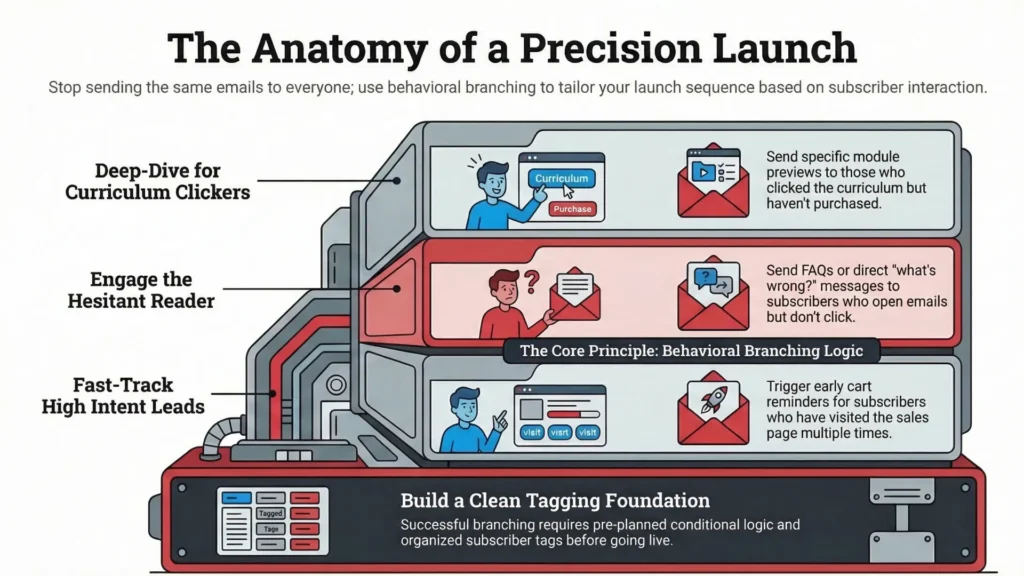
A basic launch sequence sends the same emails to everyone. A more sophisticated version branches based on what subscribers have already done.
Some practical examples:
- A subscriber who clicked “see the curriculum” but hasnt bought gets a follow-up that goes deeper on a specific module – basically answering “but will it actually cover X?”
- A subscriber who opened everything but clicked nothing gets a different angle – often FAQ, or a blunt “what are you unsure about?” message (and yes, that one only works if youre willing to read replies).
- A subscriber who hit the sales page twice gets a cart reminder earlier than someone who hasnt visited at all.
This kind of conditional logic requires clean tagging and a little planning. Its not something you want to invent for the first time during a live launch.
How the main tools handle this:
- ActiveCampaign – genuinely strong conditional branching for behavioral segmentation.
- Kit (formerly ConvertKit) – workable with tags and multiple sequences running in parallel. More manual, still fine for most course creators.
- Kajabi – can do a lot inside its own ecosystem, but if youre expecting deep branching and experimentation, its a smaller playground. Also: Kajabi does support A/B testing, but its for Email Broadcasts (not automated sequences), so you cant really “split test the whole automation” the way people assume.
The rendering problem during a course launch email sequence
This is where I want to slow down, because this is the part of launch setup that gets skipped most often and causes the most visible damage.
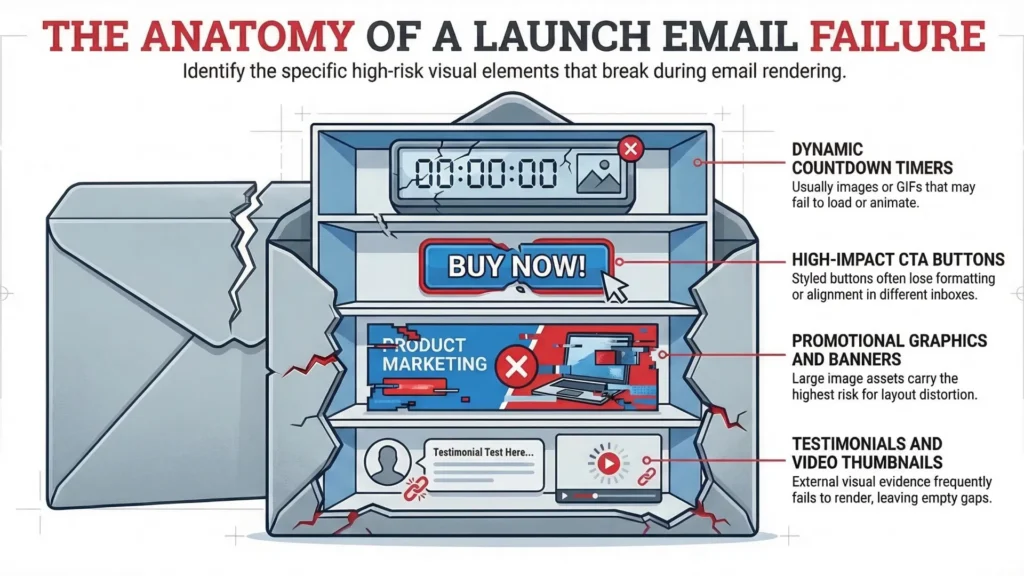
Launch emails tend to have more complex design than normal broadcasts:
- Countdown timers (usually images or GIFs)
- Bold CTA buttons
- Promotional graphics and banners
- Testimonial images
- Video thumbnails
Every one of those elements carries cross-client rendering risk.
Buttons built as images
If your “Enroll now” button is actually an image file rather than a live-text button with HTML + CSS, it can disappear when images are blocked or disabled. Live-text buttons survive image blocking. Image-buttons dont.
Dark mode color inversion
Dark mode is not just “background goes dark.” Clients apply it differently, and some will invert or rewrite colors in ways that make a carefully designed email unreadable – especially in the Gmail app, which is known for aggressive color transformations.
Gmail clipping
Gmail clips messages when the email (HTML + inline CSS + all the little bits the ESP injects) gets too big – commonly cited as 102KB, which is why you sometimes see “[Message clipped]” and “View entire message”. If the clip happens before your CTA, congrats, you just hid your own checkout link.
Background images in classic Outlook
Classic Outlook for Windows still uses Word-style rendering, which is why CSS background images dont behave like they do everywhere else. If your design relies on a background image for a key section, many Outlook desktop users will only see the fallback background color unless you build an Outlook-specific workaround (VML).11
One correction to your draft: the “this problem expires in October 2026” line is too clean, and its probably wrong. Microsoft has been auto-switching some business users to the new Outlook since January 2025, and theyve signaled a push to make new Outlook the default for many users around 2026 – but classic Outlook is still expected to remain supported for years (reporting and Microsoft Q&A answers point to at least 2029). So: treat classic Outlook as a real client you still need to support.12 (Microsoft Support)
On testing: Before any launch sequence goes live, test every email across major clients. At minimum: Gmail desktop, Gmail app on Android, classic Outlook desktop, Apple Mail on macOS (dark mode on and off), and iPhone Mail. Thats not “comprehensive” – comprehensive is dozens of environments – but its enough to catch the stuff that humiliates you in screenshots. Tools like Litmus and Email on Acid exist for this because ESP previews are not real clients. (Litmus)
Sequence 4: the cart abandonment email course sequence (the sequence that quietly makes money)
Trigger: Subscriber starts checkout (reaches the order form) but does not complete purchase
Length: 3 to 5 emails over 3 to 4 days
This one doesnt get the attention it deserves in most course creator content, probably because “abandoned cart” sounds like ecommerce and course creators dont always think of themselves as running a shop. But the logic is identical: someone got close enough to buying to start checkout, and then something stopped them.
Also, this is not a “sales page visit” trigger. Thats a different thing (browse abandonment / interest follow-up). Cart abandonment is specifically checkout-started-then-no-purchase.
When it comes to ROI, abandoned cart is usually one of the highest-performing automations in ecommerce benchmarks – often the highest revenue per recipient among common flows. Course funnels arent 1:1 with ecommerce, but the reason it works is the same: the intent is already warm.
The email structure that works
Email 1 – 1 to 2 hours after abandonment:
Gentle, low-pressure, brief: “Looks like you were checking out – did something break, or did you have a question?”
Include the direct link back to checkout. Dont lead with urgency here. They didnt forget. They left.
Email 2 – day 2:
Address the most common objection for your audience. For a lot of course launches its “fit” more than “price”: “Is this for my situation, or am I going to buy it and feel dumb on lesson two?”
A well-chosen testimonial from someone with the same doubt works well. So does a short FAQ that targets the one hesitation most likely sitting in their head.
Email 3 – day 3 to 4:
If the cart closes, this is the deadline reminder. Real urgency only. If theres no deadline because the course is always open, dont manufacture one. Fake urgency is easy to smell, and it burns trust you paid for with weeks of nurture.
Where the abandoned cart sequence breaks technically
This is the integration point that fails most often.
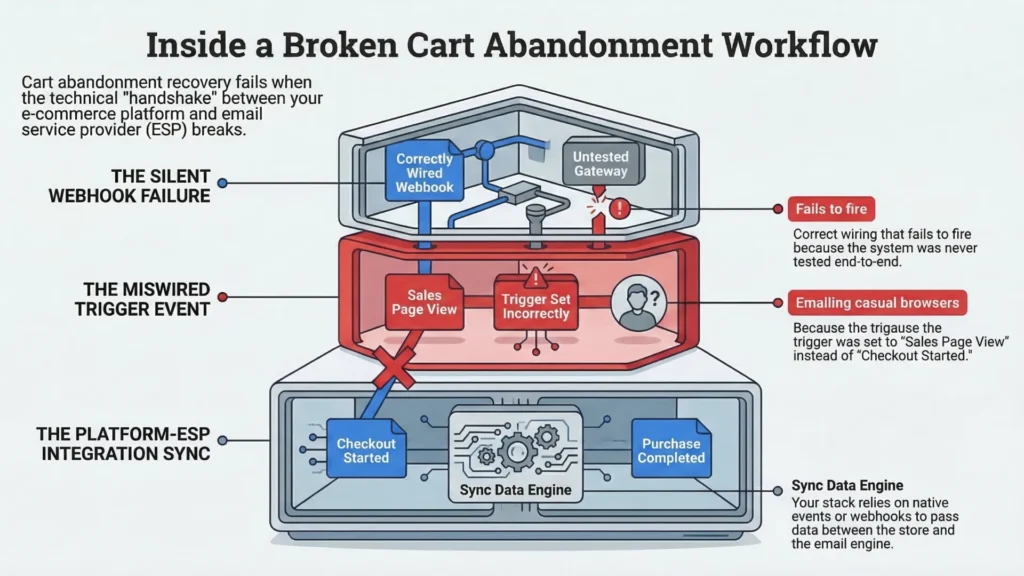
To trigger a cart abandonment email course workflow, your platform and your ESP need to agree on what “checkout started” and “purchase completed” mean – and they need to pass that info correctly. Depending on the stack, that can be a native event, a deep data integration, or a webhook / automation action that applies a tag.
The most common failure modes:
- The trigger is wired to the wrong event (sales page view instead of checkout started) so you end up emailing curious browsers like they almost bought.
- The wiring is correct, but nobody tested it end-to-end, so the webhook / event never fires and the sequence just sits there doing nothing.
Platform-specific notes:
- Kajabi – has a built-in cart abandonment email that can send after someone fills out the checkout form but doesnt complete purchase (within Kajabis checkout).
- ActiveCampaign – supports an “Abandons Cart” trigger when youre using its ecommerce integrations (for example Shopify or WooCommerce deep data).
- Kit with a separate checkout – usually means an integration path (native integration, Zapier/Make, or direct API) that applies a tag when checkout is started, then another tag (or purchase event) to stop the sequence when they buy.
Test it with a real transaction – or a proper test transaction if your platform supports it – before launch week.
A note on personalization here
If you have extra behavioral data (which part of the page they lingered on, which module they kept scrolling back to), you can mirror that in the abandonment emails. Someone who camped on the curriculum section is asking a different question than someone who reread testimonials twice then vanished.
Most course creators wont have that tracking set up, and thats fine. The three-email structure above works without it. Just dont pretend youre “doing personalization” because you inserted {{first_name}} and called it a day.
Sequence 5: the new student onboarding sequence (the sequence nobody thinks is marketing but absolutely is)
Trigger: Purchase complete – enrollment confirmed
Length: 3 to 7 emails over the first 2 weeks of enrollment
Here’s a belief that’s surprisingly common among course creators: the work is done once the payment goes through. The sale is made, the student is in, move on to the next launch.
The problem with that belief is what happens right after purchase. Buyer’s remorse is real, it’s fast-moving, and it’s fed directly by a messy post-purchase experience. A student who can’t figure out how to log in within five minutes of receiving their confirmation email has already started second-guessing the decision – and a refund request isn’t some dramatic leap from there.
This onboarding sequence is where you either reinforce the decision your new student just made, or you quietly undermine it.
The email structure that works
Email 1 – immediate, triggered by purchase confirmation:
This email has one job: get the student into the course. That means:
- Clear login instructions
- Direct link to the course platform (not the homepage – the actual course)
- What to do first – specifically, not “explore the content” but “start with Module 1, Lesson 1, it’s about 12 minutes”
- Who to contact if something doesn’t work
Keep this email short. This is not the place for an enthusiastic wall of text. The student wants access to what they just paid for. Help them do that.
Emails 2 to 4 – orientation content:
- What the course contains and in what order
- Realistic expectations on time commitment per week
- Where to get help – community, direct email, office hours, whatever support structure you have
- Any technical requirements they need to know upfront
The tone matters. Orientation content that reads like a legal document creates anxiety. Orientation content that reads like a competent human saying “here’s what to expect and how to get value fast” builds confidence.
Emails 5 to 7 – early wins:
This is the part most onboarding sequences skip, and its arguably the most important part of the whole thing.
Early momentum is one of the strongest predictors of whether people stick with online learning: early engagement signals tend to correlate with later persistence and outcomes. So if you want fewer ghosts, give students something they can finish and feel in week one.13
Build emails in this section around content that helps students get a quick, specific win before they’re deep into the course. Not the main transformation – that takes time. A smaller, concrete result they can get in a day or two that makes them think, ok, good, this was worth it.
The testimonial trigger
Around week 3 or 4, an automated email asking for feedback (or a short testimonial) should fire – timed from enrollment date, not course completion.
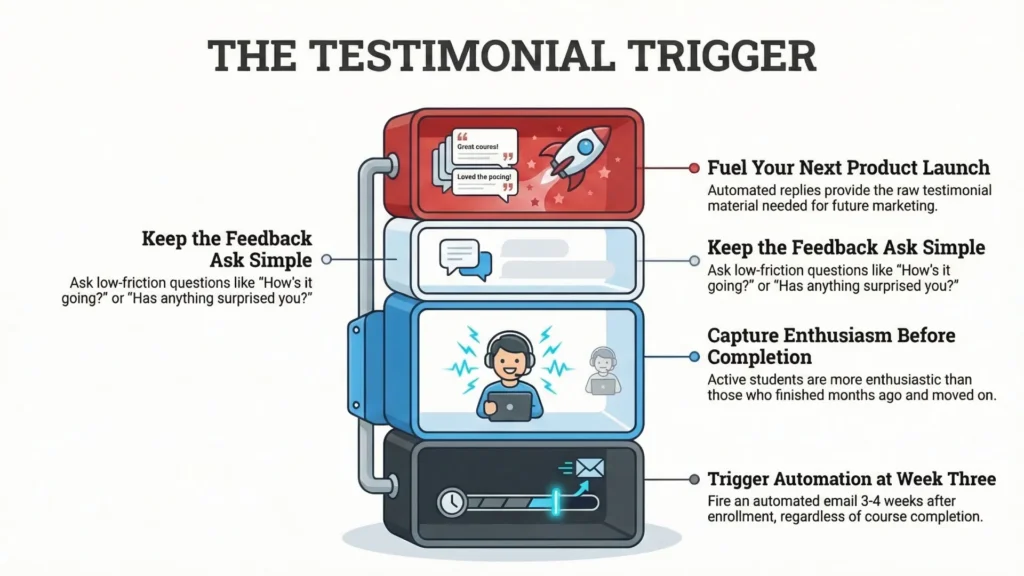
Why not wait for completion? Because most students won’t complete, but plenty will have a real experience by week 3. And honestly, a student who’s actively mid-flight and seeing results is often more enthusiastic than someone who finished months ago and has mentally moved on.
Keep the ask simple:
- “How’s it going so far?”
- “Has anything surprised you?”
- “Would you be willing to share a quick sentence about your experience?”
Replies become raw material for the next launch. The automation does the asking so you don’t rely on your memory during launch chaos.
Technical considerations by course format
The onboarding sequence needs to work differently depending on how your course is delivered:
Self-paced courses: straightforward – the sequence runs from enrollment date, timing is predictable.
Live cohort-based courses: more complex. Your ESP needs to know the cohort start date and adjust timing accordingly. A student who enrolls two weeks before cohort start should not receive “start Module 1 today” – they should receive a holding sequence (prep, orientation, calendar, expectations), then the real onboarding kicks in when the cohort starts.
Kajabi has a cohort feature with a start date, which gives you something concrete to anchor timing to inside Kajabi email automation (or to pass through to a standalone ESP).
Hybrid formats: live elements plus self-paced content – the most sequencing logic, the most ways to confuse people. Worth mapping this in a simple flowchart before you touch your ESP builder.
Sequence 6: the re-engagement email sequence (for the subscribers who went quiet)
Trigger: Subscriber has not clicked any email in 60 to 90 days
Length: 3 to 5 emails
Before getting into the structure, there’s a technical reality that matters here – because if you miss it, you build your trigger on garbage data and then blame the copy.
The apple mail privacy protection problem
Since Apple’s Mail Privacy Protection (MPP), open rates have been unreliable as an engagement metric because Apple Mail can preload tracking pixels even if the person never truly opened the email. That inflates opens and makes “opened” a pretty fuzzy concept.
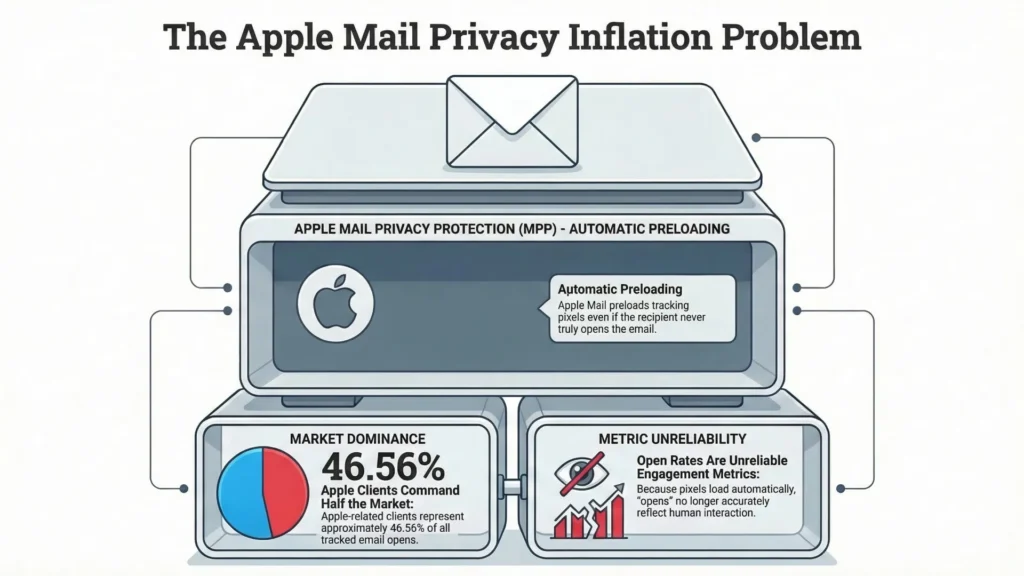
And the coverage is not small. In Litmus Email Analytics data, Apple-related clients often make up roughly half of tracked opens (January 2026: 46.56% for “Apple” as Litmus defines it).
The practical consequence (and this is the important correction):
If you’re using “hasn’t opened in 90 days” as your re-engagement trigger, you will miss a chunk of genuinely disengaged Apple Mail subscribers because they’ll still look “opened” thanks to MPP. You’ll keep them in your active segment when they are, in reality, checked out.
Use click-based engagement as your primary trigger, not opens.
A subscriber who hasn’t clicked anything in 60 to 90 days is a more reliable signal of disengagement than one who hasn’t “opened” – especially now. It’s still imperfect (some people read and never click), but it’s less of a hallucination than open data.
Why this sequence matters for deliverability, not just conversions
Mailbox providers lean heavily on user feedback signals to sort mail. Google says Gmail’s spam filters use machine learning powered by user feedback and look at signals including authentication and user input.14
Google Postmaster Tools also defines spam rate based on messages delivered to engaged recipients’ inboxes and then marked as spam by recipients – which is a very blunt reminder that what your users do matters.15
So yes, list cleanup and re-engagement is a conversions play, but it’s also how you avoid dragging your sender reputation down with a pile of people who never interact.
The email structure
Email 1 – “Are you still there?”
Simple, human, brief. Remind them what they signed up for and what’s been happening. No heavy design. No “we miss you” melodrama.
Plain or near-plain text can work well here precisely because it feels like a person, not a campaign.
Email 2 – value drop
Give them something genuinely useful with no strings attached. A piece of content, a resource, a specific insight – something that stands on its own.
If they engage with this email – click, reply – they stay in the active segment. Pick something representative of what your list is about, so the people who re-engage are the people you actually want.
Email 3 – “Should I remove you?”
Direct question with two clear options: stay or unsubscribe.
A simple layout works:
- Short paragraph acknowledging interests change
- A “Yes, keep me on the list” link/button
- A “No thanks, remove me” link that unsubscribes (or moves them to a low-frequency segment if you offer that option)
Emails 4 to 5 – if no engagement:
Move non-responders to suppression, or remove them from active sending.
Course creators hate this part because the list number gets smaller and your ego has to sit in the corner for a minute. But a smaller, engaged list tends to outperform a larger, unengaged one – and it’s easier on deliverability.
Personalization in re-engagement
If you can segment by the lead magnet or topic that originally brought them in, use it.
“You originally signed up for [lead magnet] – here’s something related” lands better than a generic “still interested?” because it’s specific. This is lightweight personalization that doesn’t require creepy tracking.
Sequence 7: the post-launch evergreen nurture sequence (so the next launch is easier)
Trigger: Launch ends – cart closes – subscribers branch based on whether they purchased or not
Length:
- Non-buyers: 8 to 12 emails over 6 to 10 weeks
- Buyers: graduate into the onboarding sequence (Sequence 5), then eventually an upsell or loyalty track
This is the sequence with the longest time horizon and, in my view, the most compounding effect. If you’re doing email automation for online courses and you only show up during cart-open week, you’re basically training your list to ignore you until you start shouting.
The two branches
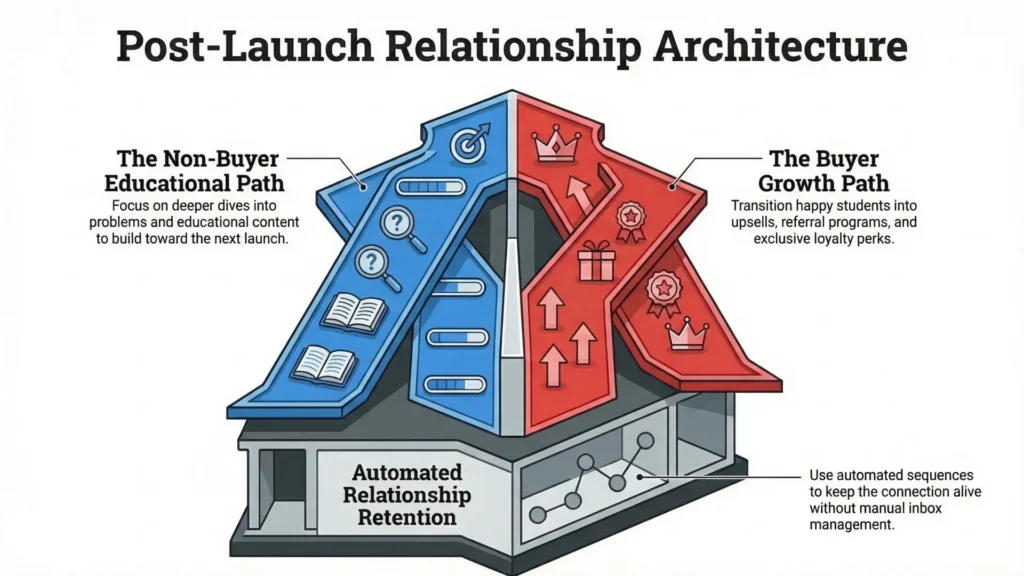
Non-buyer path:
They stayed through a full launch sequence, didn’t buy, didn’t unsubscribe. That’s not nothing.
This path is not a sad, watered-down launch rerun. Its continued relationship-building:
- Educational content related to the course topic
- Deeper dives into problems your course solves
- Occasional natural mentions that the course exists (waitlist, next cohort, evergreen enrollment if you have it)
- Content that builds toward the next launch without feeling like a slow-motion sales pitch
Buyer path:
After onboarding, happy students are candidates for:
- An upsell to a more advanced offer or a complementary course
- A referral program (or affiliate program) if you run one
- A loyalty track: early access, early pricing, community perks, whatever fits your ecosystem
The principle is the same: the relationship doesn’t end at enrollment. An automated sequence is how you keep it alive without living in your inbox.
The practical implementation
Set this sequence to run for 3 to 6 months after a launch window. Then audit and update it before the next launch cycle.
The audit matters. Tool pricing changes. Features move. “Recommended stack” lists go stale fast. A post-launch nurture sequence running unchanged for two years isn’t an asset – it’s a liability.
Quick audit checklist before you re-activate:
- Are all links still working and pointing to the right places?
- Are tool recommendations still accurate (pricing, features, availability)?
- Is any content referencing stats, screenshots, or UI that are now outdated?
- Does the sequence still sound like you?
Where inboxes and tools are going (and why this sequence matters more than it used to)
Two shifts are already in motion:
AI in the inbox is real now, not a future prediction. Gmail is rolling out AI Overviews that summarize threads. Apple Mail has Apple Intelligence features like summaries and priority messages. Outlook has Copilot-driven summaries in supported versions.
So the inbox is becoming more filtered and more mediated. Your email gets interpreted before it gets read.
AI-assisted personalization is sliding down-market. You don’t need an enterprise contract to get behavior-based send-time optimization anymore. ActiveCampaign’s Predictive Sending is a clean example: it automates send timing based on contact behavior.
The sequence architecture in this article is what those features sit on top of. If you already have tagging and routing logic that makes sense, you can plug new tooling in later without rebuilding your entire system from scratch.
The fundamentals don’t change: right subscriber, right message, right time. The tools are getting weirder. The sequences are how you stay in control of the weirdness.
The email rendering problem: why email automation sequences for course creators can break silently
Most course creator content treats sequences as a copywriting and strategy problem. Almost none of it deals with the ugly technical truth: broken rendering can kneecap conversions with no error message, no bounce, no warning – just lower revenue and a vague sense that “this launch felt weird.”
And “test your emails” is advice that sounds obvious until you ask: test for what, exactly?
What’s actually happening under the hood
Emails don’t render in one unified environment the way web pages do. There are dozens of active email clients, and each one supports its own strange, limited slice of HTML and CSS. Some ignore things. Some rewrite things. Some do both, then act innocent.
A few of the most consequential ones:
Gmail
Gmail’s CSS support is better than its reputation, and it does support <style> blocks and many media queries – but it will still ignore unsupported CSS, and there are edge cases that bite hard (especially the Gmail apps when a non-Gmail account is being viewed inside the app).
Classic desktop Outlook for Windows
Desktop Outlook on Windows uses Microsoft Word to render emails (yes, Word), which is why it’s allergic to modern CSS and why email dev has this whole parallel universe of MSO conditionals and VML workarounds.
It doesn’t handle CSS background images the way the rest of the world does, and if you want reliable background images you end up in VML land.
About the “it ends in October 2026” thing: what’s real and date-specific is that Office 2021 support ends October 13, 2026 (which includes Outlook 2021).16
Separately, Microsoft has started automatically switching some business users to the new Outlook starting January 2025 (Current Channel + Business plans).17
But that doesn’t mean classic Outlook vanishes on a specific day. It means the migration pressure increases, and you’ll have a mixed audience for a long time. So you still have to care about classic Outlook rendering if your list includes corporate Windows users.
Apple Mail
Apple Mail tends to support modern CSS better than most clients. The complication is dark mode: Apple Mail will apply dark mode styling and you can end up with shifted colors, inverted-looking sections, or contrast issues if you didn’t plan for it.
Outlook for Mac, Outlook.com, Outlook for iOS and Android
These are not “the same Outlook.” They don’t share the same rendering engine as classic Outlook for Windows, so testing “Outlook” as one checkbox is how you miss problems.
The specific rendering risks in launch emails
Launch emails tend to be more complex than regular broadcasts – more design elements, more CTAs, more layout tricks. Complexity means more places to break.
Buttons built as images vs live-text buttons
If your “Enroll now” button is an image, it can disappear when images are blocked or not loaded. Live-text buttons (HTML + CSS) survive because there’s no image to block.
A button that vanishes when images don’t load isn’t a “design issue.” It’s an implementation choice you can avoid.
Dark mode color inversion
Dark mode is not one thing. Clients handle it differently, and some will override colors in ways that make elements unreadable. The practical fix is deliberate dark mode coding (where supported) using prefers-color-scheme, plus sensible fallbacks.
Gmail clipping
Gmail clips messages when the email exceeds about 102KB and hides the rest behind “View entire message.” If the clip happens before your CTA, you just buried your own checkout link.
(And yes, ESP link tracking can bloat the HTML enough to push you over the edge.)
Background images in classic Outlook
Classic Outlook doesn’t behave like a browser. If your design relies on CSS background images for contrast or hierarchy, a chunk of Outlook users will see a sad fallback (or worse, a blank-looking section) unless you build an Outlook-specific workaround.
What ‘testing’ actually means
Testing an email means checking how it renders across the clients your subscribers actually use – not just previewing it in your ESP.
ESP previews are fine for catching obvious mistakes. They are not running your email through real client rendering engines, which is where most of the painful stuff shows up.
Minimum viable test for a course launch email sequence: Gmail desktop, Gmail app on Android (especially if you have a global audience), classic Outlook desktop (2019/2021 style), Outlook.com, Apple Mail on macOS (dark mode on and off), and iPhone Mail.
Tools like Litmus and Email on Acid exist for a reason: they let you preview across a large matrix of clients and get screenshots so you’re not guessing. (Litmus)
For a launch window – high stakes, low time to fix – running every launch email through a real client preview tool before it goes live isn’t “nice to have.” It’s basic infrastructure.
The tools for email automation sequences for course creators
There isn’t one correct ESP. Anyone claiming there is usually has a referral link tattooed on their soul.
Pick based on your tolerance for complexity, how much branching you actually need, and whether you want all-in-one or best-in-class.
Kit (formerly ConvertKit)
Best when you want creator-friendly tagging, simple branching, and you don’t want to feel like you’re configuring aircraft software.
- Free plan exists and supports up to 10,000 subscribers, with a limited number of automated sequences on that tier.
- Direct integrations exist with common course platforms (Kajabi, Teachable, Thinkific, Podia).
- A/B testing is available for broadcasts, but don’t confuse that with “I can properly split test an entire automation like an experiment lab.”
ActiveCampaign
Best when you’re serious about behavioral branching, segmentation, and you want the automation builder to feel like it could run a small city.
- Pricing is contact-based and plan-based (Starter/Plus/Pro/Enterprise). Their pricing page is the source of truth because it changes.
- Predictive sending and other personalization features are built in on supported plans.
Kajabi email automation
Best when you want fewer moving parts and you’re already living inside Kajabi for course delivery and checkout.
- Kajabi’s current public pricing tiers list contact limits (for example: Growth includes 25,000 contacts).
- Kajabi supports A/B testing for Email Broadcasts.
If you need deep behavioral routing and complex logic, Kajabi will feel tight. If you want “everything in one place and mostly works,” it’s fine.
MailerLite
Best when you want decent automations on a budget and you care about building decent-looking emails quickly.
- Paid plans start around $10/month; free plan is limited (500 subscribers, 12,000 emails/month).18
GetResponse
Best when you’re in markets where it’s common, or you want a broader marketing suite vibe.
- Pricing starts at $19/month for 1,000 subscribers (plan features scale from there).19
A note on what’s changing in the next 2 to 3 years
Open rates are not reliable.
Apple Mail Privacy Protection preloads tracking pixels, which inflates opens and breaks any automation logic that depends on “last opened.”
Also, Apple is a huge chunk of observed opens in the wild (Litmus January 2026: 46.56% for Apple).
So if your re-engagement email sequence or lead scoring depends on opens, you’re building with warped metrics. Clicks are still imperfect, but they’re less fake.
Authentication is now mandatory, not optional (for bulk senders).
Google’s sender guidelines call out DMARC setup and require one-click unsubscribe for senders above the 5,000 messages/day threshold.20
Yahoo’s best practices also push SPF/DKIM/DMARC and notes DMARC is a requirement for some senders.21
Microsoft followed with new requirements for high-volume senders to Outlook.com domains (5,000+ emails/day), pushing SPF, DKIM, and DMARC compliance, with enforcement timelines communicated for 2025.22
AI personalization is sliding down-market.
This isn’t just “future vibes.” Features like predictive sending (contact-level send time optimization) are already in mid-tier tools. (ActiveCampaign Help Center)
If your tagging and routing are a mess, AI won’t save you. It’ll just automate the mess faster.
The inbox is getting more filtered.
More sorting based on engagement history, more summarization, more “I decide what you see.” The only sustainable play is still the boring one: send stuff people actually engage with, to people who actually asked for it.
FAQ: email automation sequences for course creators
How many emails should be in a course launch email sequence?
For a typical 7 to 10 day cart-open window, 8 to 14 emails isn’t unusual. Close day often needs 2 to 3 sends because that’s when urgency becomes real and people finally decide. (Don’t treat those numbers like a law of physics. Treat them like “this is normal in the wild.”)
What’s the difference between a pre-launch email sequence and a launch sequence?
Pre-launch is relationship and problem framing over weeks. Launch is direct sales communication during the cart-open window. Launch performs better when pre-launch did its job.
Do I need all 7 sequences before my first launch?
Minimum viable: welcome sequence course creator flow, a short pre-launch nurture, the launch sequence, onboarding, and – if your stack supports it – a cart abandonment email course sequence. Re-engagement and post-launch evergreen nurture can come right after launch one.
Can I build these sequences in Kajabi without a separate ESP?
Often, yes. Especially early. Kajabi’s contact limits are plan-specific though (for example: Growth includes 25,000 contacts), so cost and constraints show up as you scale.
If you want heavy behavioral branching (ActiveCampaign course creators style logic), pairing Kajabi for delivery with ActiveCampaign for automation is a common move.
Why are my launch emails going to Promotions in Gmail?
Promotions vs Primary is mostly about classification and engagement patterns, not “you forgot DKIM.” Authentication impacts deliverability; classification is its own machine.
If you want a practical lever: build early engagement in your welcome flow (replies, clicks), because Gmail learns per-subscriber behavior over time.
What is the Outlook rendering engine change happening in 2026?
Office 2021 (including Outlook 2021) reaches end of support on October 13, 2026.
Separately, Microsoft started automatically switching some business users to the new Outlook starting January 2025.23
The takeaway for email automation for online courses: plan for a mixed Outlook audience. Don’t assume “Word-engine Outlook disappears in 2026.” It won’t.
What’s the most common technical mistake in email personalization course launch setups?
The untested cart abandonment trigger. It “looks enabled” in the dashboard, but the event never fires in real life because the integration is wrong, or the stop-condition isn’t set, or nobody tested an actual checkout path.
Test it with a real checkout before launch week. Not with vibes.
Closing
The sequences in this article aren’t complicated in concept. A welcome sequence that segments, a pre-launch nurture that earns trust, a launch sequence that doesn’t spray the same message at everyone, a cart abandonment sequence that recovers intent, onboarding that reduces refunds, a re-engagement sequence that protects deliverability, and a post-launch nurture that keeps the list warm.
What makes it work is building it before the launch, not during it.
Setup under pressure is when triggers get miswired, integrations get skipped, and “I tested it in preview” becomes the last thing you say before someone sends you a Gmail Android screenshot with your CTA missing.
If you want someone to audit your email automation sequences for course creators or build them clean, the contact details are in the header. If you’re building it yourself: map backwards from cart close, wire the triggers, and test every email in real clients before anything goes live.
The infrastructure isn’t glamorous. It’s just what everything else runs on.
Quiz to test your knowledge
Let’s play! To solidify what you have learned, take a short quiz.
Results


#1. At what approximate file size does Gmail typically clip an email and hide the remaining content behind a ‘View entire message’ link?
#2. Why does classic desktop Outlook for Windows often fail to render modern CSS, such as background images or complex layouts?
#3. According to the source material, why are ‘open rates’ no longer considered a fully reliable metric for determining subscriber engagement?
#4. What is a key tactical objective of the ‘New Student Onboarding’ sequence?
#5. Which email service provider is highlighted as having superior conditional branching for sophisticated behavioral logic?
#6. What is a significant risk of using ‘Enroll now’ buttons that are built as image files?
#7. According to the source, why is focus on ‘early wins’ critical during the first two weeks of student enrollment?
#8. How many emails are typically recommended for the final day of a course launch cart-close window?
#9. Which of the following is now a mandatory authentication requirement for bulk senders to Gmail and Yahoo?
#10. Which of the following is recommended as the primary trigger for a re-engagement sequence in a post-MPP environment?
Footnotes
- https://mailchimp.com/resources/marketing-segmentation-and-personalization/ ↩︎
- https://kit.com/pricing ↩︎
- https://help.kajabi.com/en/articles/12696100-email-a-b-testing-overview ↩︎
- https://developers.google.com/workspace/gmail/design/css ↩︎
- https://www.litmus.com/blog/a-guide-to-rendering-differences-in-microsoft-outlook-clients ↩︎
- https://www.emailonacid.com/blog/article/email-development/how-to-code-emails-for-outlook/ ↩︎
- https://help.kit.com/en/articles/4306079-how-to-automatically-tag-subscribers ↩︎
- https://help.activecampaign.com/hc/en-us/articles/218788707-Automation-triggers-explained ↩︎
- https://getcourse.ru/blog/1138947 ↩︎
- https://www.mattmcwilliams.com/how-close-sales-final-day-launch/ ↩︎
- https://www.emailonacid.com/blog/article/email-development/html-background-images-in-email/ ↩︎
- https://support.microsoft.com/en-us/office/switch-to-new-outlook-for-windows-f5fb9e26-af7c-4976-9274-61c6428344e7 ↩︎
- https://pmc.ncbi.nlm.nih.gov/articles/PMC6189675/ ↩︎
- https://workspace.google.com/blog/identity-and-security/an-overview-of-gmails-spam-filters ↩︎
- https://support.google.com/a/answer/14668346 ↩︎
- https://support.microsoft.com/en-us/office/end-of-support-for-office-2021-cae4a42b-1234-4d1f-bf45-c504a64c7352 ↩︎
- https://support.microsoft.com/en-us/office/switch-to-new-outlook-for-windows-f5fb9e26-af7c-4976-9274-61c6428344e7 ↩︎
- https://www.mailerlite.com/pricing ↩︎
- https://www.getresponse.com/pricing ↩︎
- https://support.google.com/a/answer/81126 ↩︎
- https://senders.yahooinc.com/best-practices/ ↩︎
- https://techcommunity.microsoft.com/blog/microsoftdefenderforoffice365blog/strengthening-email-ecosystem-outlook%E2%80%99s-new-requirements-for-high%E2%80%90volume-senders/4399730 ↩︎
- https://support.microsoft.com/en-us/office/switch-to-new-outlook-for-windows-f5fb9e26-af7c-4976-9274-61c6428344e7 ↩︎